Inspiring
May 10, 2020
Answered

How do I spread out the images so I can see them?

  • May 10, 2020
  • 2 replies
  • 787 views

It seems like this should be idiot simple but this idiot hasn't figured it out.

I'm makeing a video from still images.  I imported about 30 images, but they're all jammed together.  How do I spread them out so I can see and rearrange them? 

 

This topic has been closed for replies.
Correct answer Bill Sprague

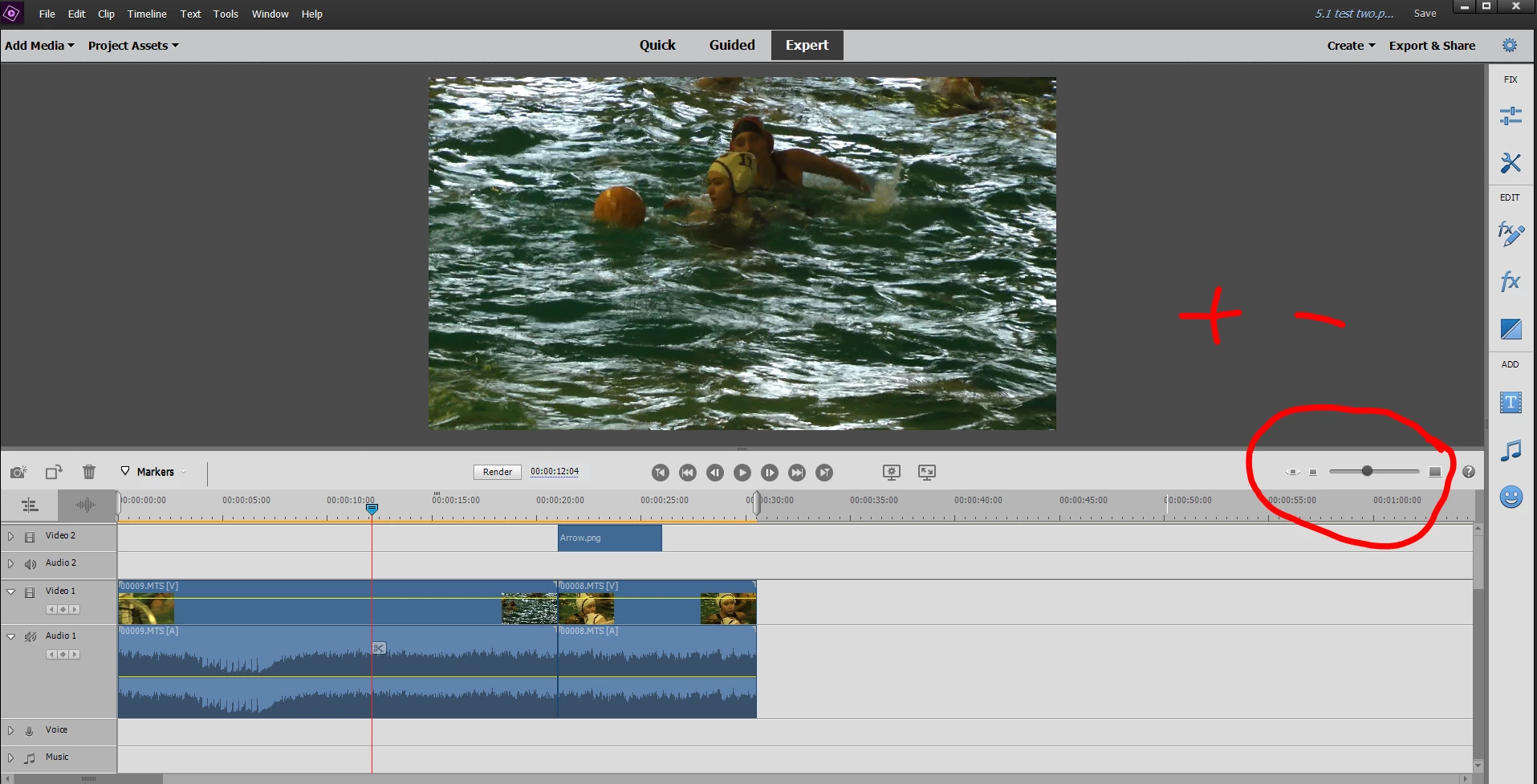
"+" or "-" keys.  You can also use this slider.    A "\" fills the time line.  

2 replies

Community Expert
May 11, 2020

Be sure your project settings are right.  It is common on this forum for still image slide shows to get started as an "interlaced" project.  Most universal for most screens is to manualy set the project to "1920x1080p30" at the start.

Bill SpragueCommunity ExpertCorrect answer
Community Expert
May 11, 2020

"+" or "-" keys.  You can also use this slider.    A "\" fills the time line.  

i_am_jimAuthor
Inspiring
May 11, 2020

Thank you.  I don't have +- keys but I have a slider.

. Windows 10 -- Premiere Elements 2018 -- Photoshop CC