


December 22, 2025
Question

How do I toggle the track mode in Premiere Elements 2026?

  • December 22, 2025
  • 2 replies
  • 303 views

I am completely mystified by the way the video and audio tracks are displayed in the newest version.
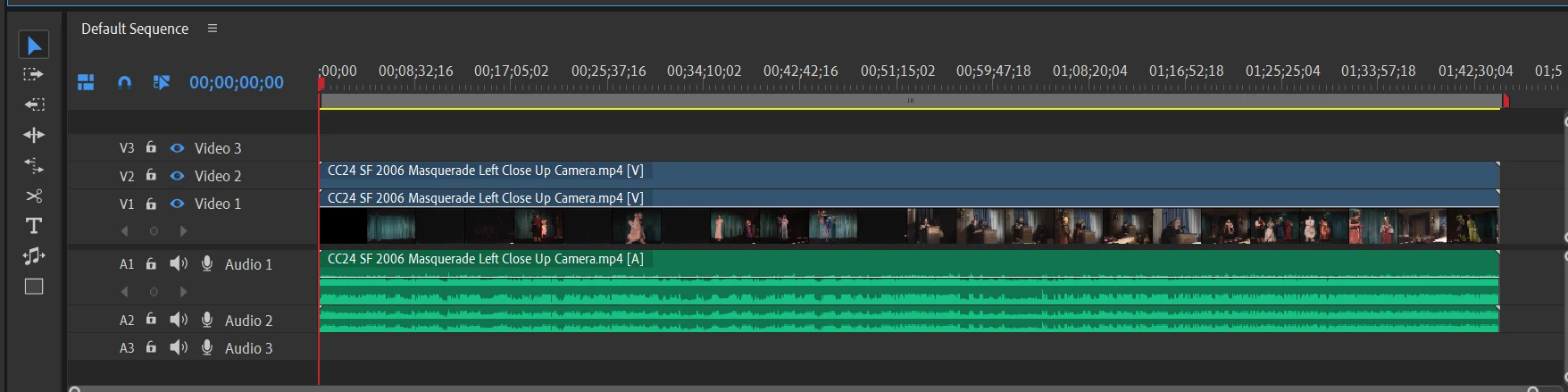
 

I want to have my second video audio track appear below my second video track.  I can find no way to do this, and yet it was the way they appeared in previous versions.  What am I missing here?

2 replies

Legend
December 22, 2025

To create a new track, drag your audio (or video) clip to an area above or below the current track(as). When you drop it, the new track will appear,.


You can also right-click on any of the Track Headers (left of the track) and select Add Track.

Ann Bens
Community Expert
Community Expert
December 22, 2025

@Steve Grisetti 

Adding tracks is the same as in 2024, but OP wants video and audio of the same clip stacked together

V3

A3

V2

A2

V1

A1

instead of the new layout which are now separately.

V3

V2

V1

=====

A1

A2

A3

Legend
December 22, 2025

I see....

Ann Bens
Community Expert
Community Expert
December 22, 2025

Elements has been completely revamped. New layout (same as in Premiere Pro). Cannot change this.

Might need some getting used to but most editing software have this layout.


December 23, 2025

Seriously?   It's not intuitive.  This makes it more difficult to keep track of which tracks and audio belong to which and being able to cut .  I'm starting to regret getting this version.  Good thing I have an older version to fall back on for a multi-camera edit.