


Cong Thanh Nguyen
Participant
September 22, 2017
Answered

How do you flip an image or gif (Mirror Image) on Adobe Elements 15 Video Editor?

  • September 22, 2017
  • 2 replies
  • 6348 views

How do you flip an image or gif (Mirror Image) on Adobe Elements 15 Video Editor?

Thank You. I tried looking it up but all I get are the old Element Video Editors.
    This topic has been closed for replies.
    Correct answer Bill Sprague

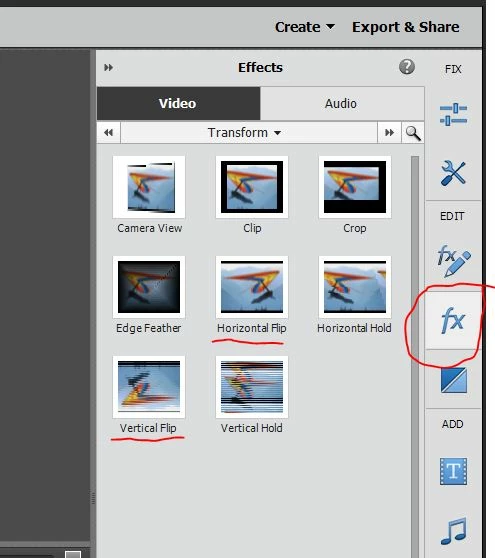
    Apply an effect in the "fx" section.  In the transform group there is both Horizontal and Vertical Flip.

    Bill

    2 replies

    Bill SpragueCommunity ExpertCorrect answer
    Community Expert
    September 22, 2017

    Apply an effect in the "fx" section.  In the transform group there is both Horizontal and Vertical Flip.

    Bill

    Cong Thanh Nguyen
    Participant
    September 22, 2017

    THANK YOU!

    Ussnorway7605025
    Legend
    September 22, 2017

    moved to premiere Elements forum