Known Participant
April 11, 2022
Answered

How to import short length pictures to make a stop motion project

  • April 11, 2022
  • 2 replies
  • 213 views

Hey guys... super quick question. Is there a way to get Adobe to default picture length to shorter than 1 second? No matter what I do, I can't get it shorter. I recently finished a stop motion project that had probably at least 1,500 pictures or more, and I had to manually drag each of them to a shorter length.


I experimented with using time stretch, but I was constantly adding new pictures to the project and time stretch didn't seem to get the same length every time, so I had to keep manually dragging them shorter anyways.


Is there a better way here? Thanks!

This topic has been closed for replies.
Correct answer Ann Bens

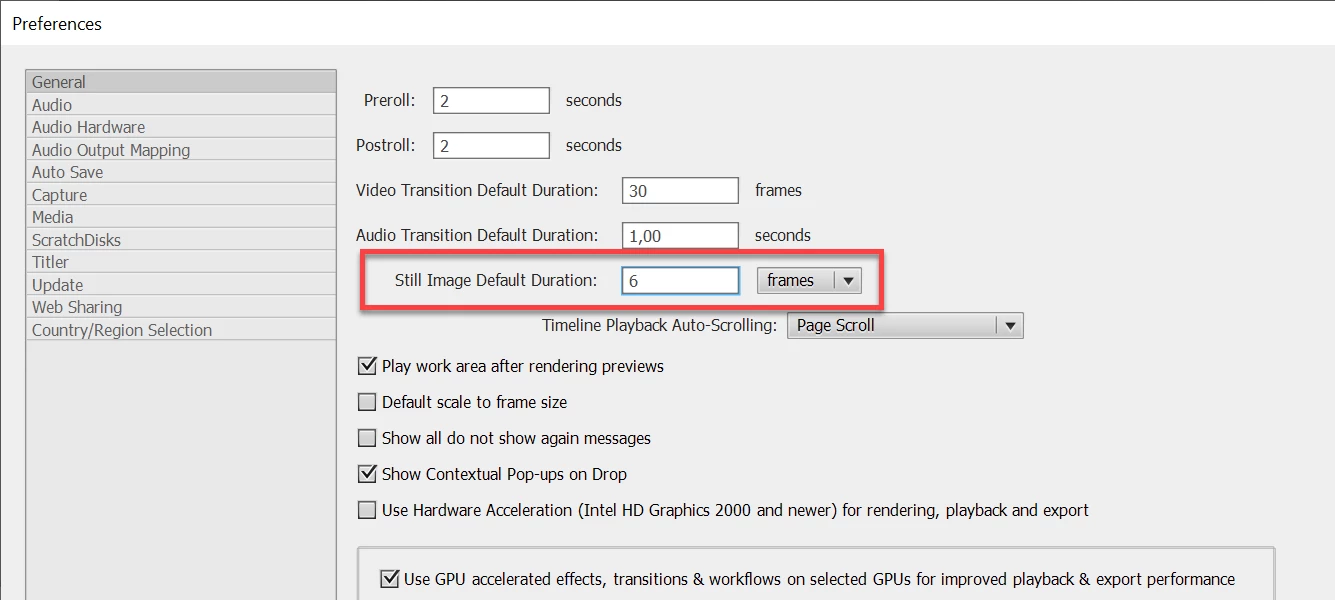
You need to set the preferences before you import the stills.

Stop motion is on average 6 frames.


2 replies

Ann Bens
Community Expert
Ann BensCommunity ExpertCorrect answer
Community Expert
April 11, 2022

You need to set the preferences before you import the stills.

Stop motion is on average 6 frames.


Known Participant
April 11, 2022

DUUUUUUUUUUUUUUUUDE you just saved me an incredible amount of time omg!!!


Thanks so much!!! It worked perfectly! My days of manually shortening thousands of pictures are over!!

John T Smith
Community Expert
Community Expert
April 11, 2022

Try Edit--Preferences--General--Still Image Default


I do NOT know if you may set for less than one second