



HOTELECHOMIKE
Inspiring
April 15, 2017
Answered

HOWTO / PE14: Looking for the Right Arrow symbol

  • April 15, 2017
  • 2 replies
  • 4158 views

PE 14.1 on a WIN7 PC...

I know that one can add certain symbols to the "Default Text" e.g. from a windows machine and when using the Type Tool:

press the keyboard shortcut Alt+0169 from the numeric keypad to insert a copyright symbol.

Similarly Alt+0176 for the degree symbol.

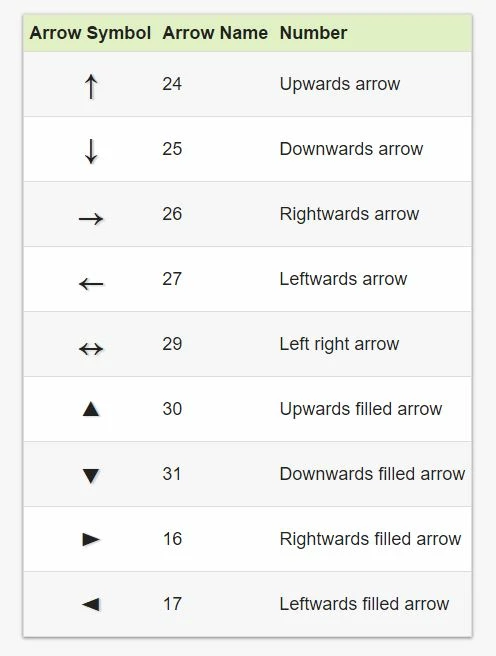
I'm looking for the code to create a simple right arrow i.e. a better version of:  Fire damage ==>

Is there a list of such symbols anywhere?  I did some searching but the table I found was for ASCII and the known symbols did not match.
This topic has been closed for replies.
Correct answer Bill Sprague

Try ALT+26  and you get  

2 replies

Bill SpragueCommunity ExpertCorrect answer
Community Expert
April 15, 2017

Try ALT+26  and you get  

Community Expert
April 15, 2017

You can also make a file in Photoshop with a clear background and an arrow in it.  Put it in your Premier Elements project on a track above you video line.  You can move it around, rotate it, enlarge it, shrink it, etc with the Motion Tools in the Applied Effects panel. 

I put the file "red arrow.psd" on DropBox if you want to use it:  https://www.dropbox.com/s/es18ct31y68fe81/red%20arrow.psd?dl=0

Good luck with your project!

Bill

HOTELECHOMIKE
Inspiring
April 16, 2017

The Alt+26 combination certainly works

I don't have photoshop available but I have stored the Red Arrow that you provided as that might be better...

Good luck with your project!

Many thanks.  After a pause of several months I've returned to editing the vast number of video clips we took on our US vacation in October 2016.  Currently working on the visit to Crater Lake (Oregon) with blue sky & snow on the ground.  Our videos from Lassen Volcanic National Park are complete & on YouTube (look eg for "Warner Valley October 2016").

Peru Bob
Community Expert
Community Expert
April 15, 2017