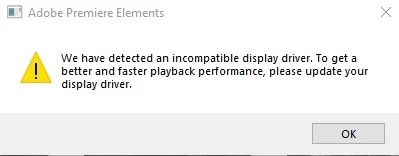
That's rare, but not completely unusual. The thing to do is go the graphics card supplier (like Nvida) and check for updated video drivers.
Since Premiere Elements 2019 code was put together and "sealed" maybe 18 months ago, it is also possible that a graphics card update has code in it that doesn't work. Sometimes people have to "roll back" their video drivers.
Why did you buy 2019? The current version is 2020.
OMG.....!!!! I thought this 2019 was the latest version,when did they roll-out this 2020 version and from whom can I buy it if I decide to. Reason I am with the 2019 is because all these symbols,gadgets and the rest are hard for me to make use of. So I figure just try and learn with this version. Also it was cheaper from Amazon which did not mention a newer version. This is my PC specs...Win 10 pro- Intel Core i7-6700K CPU @ 4.00GHz, 24.0GB Ram, NVIDIA GeForce GTX 960....I thought since I spent over a grand-$1000+ this XPS 8900 Dell could work with this with-out any hangups,but even their foreighn Dell SPT that I payed for were stumped....!? Any way I will give the rollback on this driver a try when I find the time-Thank-You for the responce.



 AdChoices