JeffWhoWouldPreferPhone
Inspiring
November 16, 2016
Answered

I cannot change project settings in Premiere Elements 14.

  • November 16, 2016
  • 2 replies
  • 3112 views

The directions/help say that I should see a dialogue box when I open a new project, and the directions follow from there. However, I see no dialogue box. The project opens, and settings at that point cannot be changed.

[Moved from non-technical Forum Lounge to specific Program forum... Mod]

[Here is the list of all Adobe forums... https://forums.adobe.com/welcome]

    This topic has been closed for replies.
    Correct answer JeffWhoWouldPreferPhone

    For the record, the difference between the clip as it exists outside the project (right) and the clip as it exists when imported (left) appears below. Note this is true only of some clips, and the size-change retroactively has been applied to some existing projects that were made with Adobe 9, the version I had before 'upgrading' to 14 in the summer. I cannot zoom in or out or change size (at least, I can't zoom to include the parts of the clip that have not been imported). That version at left is literally the entire clip, once imported into a project:
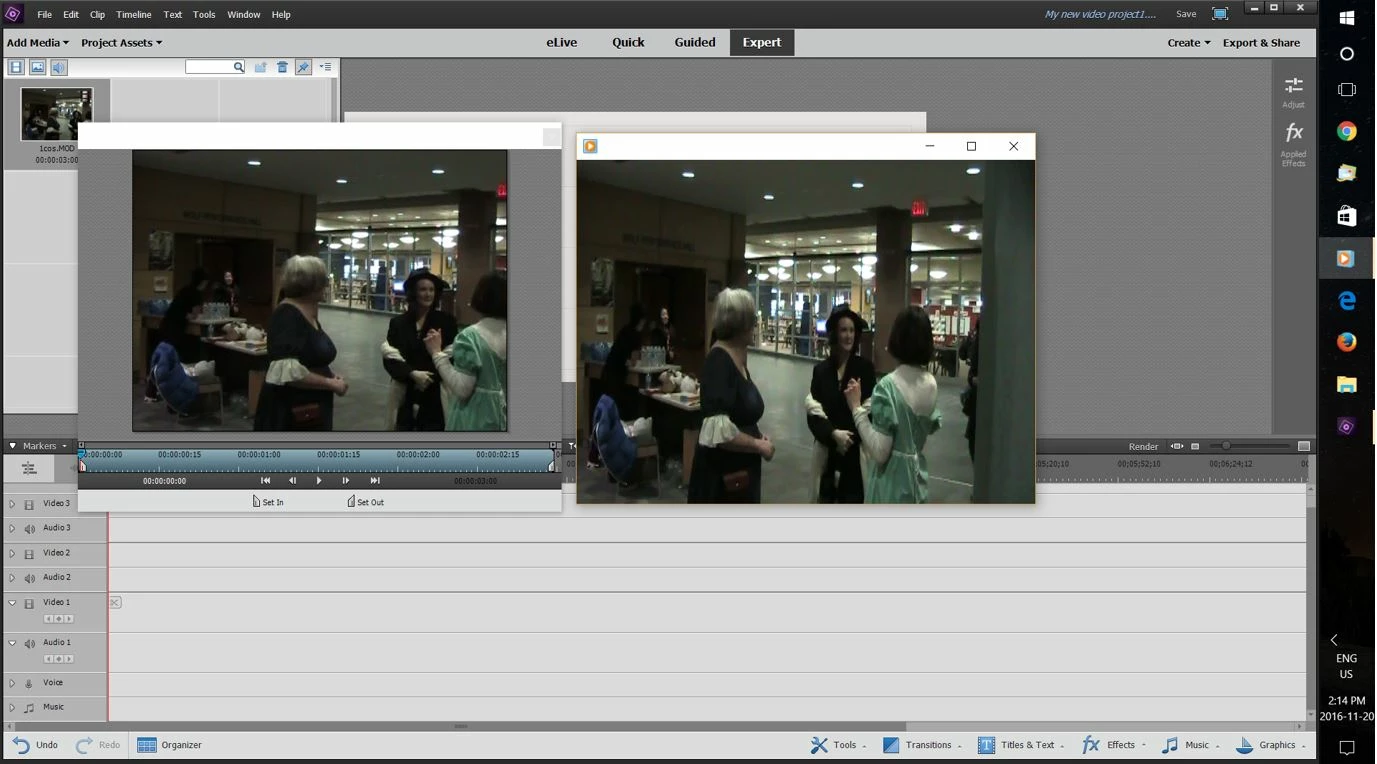

    Two problems:

    -one minor glitchy issue that seems to be gone with the reinstall

    -the projects and files that were at issue were or used MOD files. It appears from posts around this forum and elsewhere there is a long history with MOD files and Premiere not working together, though they work fine in my old Elements 9.  The solution appears to be either editing such projects with an older (but not too old) version of Elements or to use Elements (or various conversion programs) to change MOD files to anything that Elements can read properly..

    Of course, given that the problem seems only to apply to really old or more recent versions of Elements, I wonder if it can be addressed by Adobe.


    2 replies

    Legend
    November 17, 2016

    If you're not seeing the New Project screen when you choose New Project from the File menu, something is definitely wrong. I've never heard of that in 11 years of moderating this forum.

    Have a look at part 1 of my free 8 part Basic Training for Premiere Elements. At about 4:20, you'll see instructions for starting a new project and selecting your settings.

    *** Basic Training for Premiere Elements ***

    JeffWhoWouldPreferPhone
    Inspiring
    November 17, 2016

    I'll look at that, but here is the situation:

    -clips are being cropped according to settings that have nothing to do with the aspect ratio of the clip.

    -one project I completed last year in Elements 9 comes up with settings changed, even though settings are "locked" after a new  project is completed. This one was not only completed (albeit in an older version of Adobe Premiere Elements), it previously had been saved, exported, et cetera.

    All of this is new. I have not had this problem previously. I updated in the summer, and I created a project as recently as two weeks ago without any issues.

    Again, would it be a problem if I reinstalled my copy of Elements? I will also look at your Basic Training link, of course, though I have been using versions of Adobe Premiere since the early 2000s. I admit that the updated version which I installed this summer frequently confuses me.

    If I cannot resolve this problem soon, I will be using a different editing program entirely.

    JeffWhoWouldPreferPhone
    Inspiring
    November 20, 2016

    I reinstalled Elements. No change.

    It would be incredibly helpful if phone support was available for this product.

    Legend
    November 16, 2016

    What happens if you go to the program's File menu and select New Project?

    JeffWhoWouldPreferPhone
    Inspiring
    November 16, 2016

    I get a project with settings I cannot change.

    Keep in mind this is the first time since I downloaded 14 that this has been a problem. I'm wondering if I should reinstall.

    Community Expert
    November 17, 2016

    After a new project is started, the settings are locked.  

    The "normal" procedure is to start a new project, add some media and place a clip on the timeline.  That will set the project perfectly for the media you are using.   If you know "normal" won't work, then you make the settings at the first screen presented when you start the new project.
