
nathanaelw81512347
Known Participant
Sep 28, 2017 3:10 PM UTC
Question

I don't know why this clip won't work in the timeline?

Hi,

I'm trying to import a clip into the timeline. I have Premier Elements 13. For some reason its not working, It goes blurry and jumpy - looses definition. I'm not sure why?

Here is the clip info:
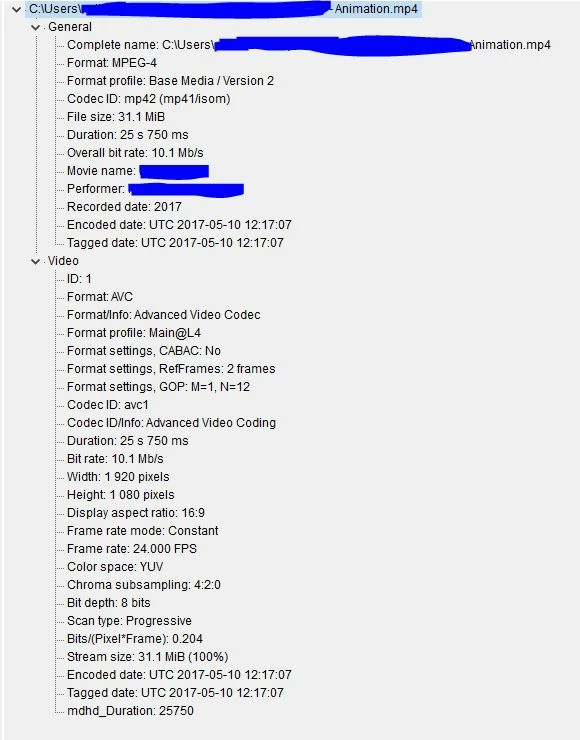
Thanks 🙂

This topic is closed to new replies. Start a new post to keep the conversation going.

12 replies

Legend
Oct 1, 2017 9:54 PM UTC

I don't know what to tell you. It must be something in the original footage.

If you'd like to post your original video to a public FTP site and link people to the download, we can play with it at our end. But otherwise, I don't know what's up.

Translate
nathanaelw81512347
Known Participant
Oct 2, 2017 7:20 PM UTC

Thanks for your offer, I'm going to take it to a local media centre tomorrow, but if they can't help I'll try and get it to you so you can have a look.

Will let you know☺

Translate
Participant
Oct 4, 2017 6:37 PM UTC

I took it to the media centre and when they tried it on a Mac it worked fine, and when they looked at the (original) clip's properties it showed the codec as H.264, and they couldn't understand what was going on. So I did what I needed to on Final Cut Pro X. It still didn't solve the overall problem, as I may need to edit films from the same source in the future, and I don't really want to keep going back to the media centre.

(this is the same Nathanael, just using my Adobe account instead of my Google one!)

Translate
Legend
Sep 30, 2017 8:12 PM UTC

What settings did you use for your conversion?

My tutorial shows you how to convert using the free download Handbrake. Try it with these settings and see what your results are.

Handbrake - YouTube

Translate
nathanaelw81512347
Known Participant
Oct 1, 2017 5:37 PM UTC

I've just tried it, I'm afraid that its actually a little worse?

Translate
Legend
Sep 30, 2017 1:05 AM UTC

H.264 MP4.

Translate
nathanaelw81512347
Known Participant
Sep 30, 2017 5:57 PM UTC

I've just converted it to H.264, but now its doing it even out of Premiere - just playing it in my local media player. I've attached a screenshot. The lines in the building should be solid black, not dotted. Some lines (around the windows and roof) are missing.

Translate
Legend
Sep 28, 2017 11:48 PM UTC

I agree with Bob. Converting to a more standardized codec will be your best solution. (MP42 is listed as the codec ID no your MediaInfo report.)

Translate
nathanaelw81512347
Known Participant
Sep 29, 2017 3:21 PM UTC

Thank you both for your advice, which codec do you suggest?

Translate
Legend
Sep 28, 2017 7:57 PM UTC

An MP42 codec?

Where did this video come from? Is it from a camcorder?

Translate
nathanaelw81512347
Known Participant
Sep 28, 2017 8:33 PM UTC

Hello Steve, Thanks for your reply,

What do you mean by a MP42 Codec?

The video is an exported animation from SketchUp.

Translate
Peru Bob
Community Expert
Community Expert
Sep 28, 2017 10:41 PM UTC

You might try converting the video with FFMpeg to a more standard codec.

https://www.ffmpeg.org/

Translate