denno
Known Participant
December 27, 2018
Answered

I need stupidly basic help w/premiere

  • December 27, 2018
  • 1 reply
  • 789 views

Greetings.

Once upon a time I pretty successfully and pretty quickly put together a couple vids for YT in Movie Maker.
In fact, I'm probably gonna go back to my old desktop running Win 7, and do that again.

I have acquired Premiere Elements 13.  I cannot do anything in it yet.  Because I need to know, for instance, how to zoom into the timeline so I can see the spikes on the audio track.  I cannot figure out how to do that.  I must have done that in Movie Maker.  I can do that in Audacity.  Don't see it in PE.  (Yeah, there is one control, but it does not zoom in far enough on a 3 hr. vid of my band to see those spikes.)

Cut it into shorter pieces, maybe?  A little dim on how to do that.  I'd really like to be able to see where I am when I am cutting.

Another instance------I can get that vid so I am looking at minute one to minute 5.  But I want to cut off the first, say, seven minutes.  I cannot figure out how to scroll (or whatever) to the right to see farther down the timeline than what is appearing.

Get it?  I need Actual, Really, Really elementary instructions.  The dumbest manual seems to assume things that are not transparent to me.

What do I do about this?

I have a For Dummies book that greatly precedes 13, and I am trying to get somewhere with that.  Still not sure it is Dumb enough for me, as above.
Is there anything around that starts at my level?

I suppose I will go for the trial month at lynda.com and see how elementary it is.  But really not about to spend $30 / mo. for that.

Hope some of you know some manual for non-intuitive neophytes.

Thanks,

denno

    This topic has been closed for replies.
    Correct answer HOTELECHOMIKE

    I guess its the same with most software - when you first try to use it you are overwhelmed by lots of features you think you'll never use & cannot find the simple functions you want.  Changes with experience of course.  Still most people probably only use a subset of the features.  And the rant about documentation making assumptions - I was 43 years in the IT buisness and came across this frequently - documentation tends to be written either by (poor) people who have never had contact with the hardware or software they are describing or by experts who (a) hate having to document or (b) inherrently know everything & this leave out a few vital steps.  In my final years I was with a major manaufacturer of computer hardware & spent much effort writing instructions for installing complex hardware where NO STEP was missed out even at the risk of stating the Bleed*** Obvious.

    Because I need to know, for instance, how to zoom into the timeline so I can see the spikes on the audio track.

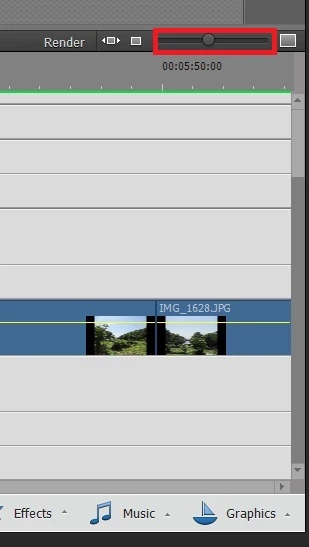
    Assuming you are in EXPERT mode, the slider for zooming is to the right of the RENDER button:

    I cannot figure out how to scroll (or whatever) to the right to see farther down the timeline than what is appearing

    The horizontal slider for this is at the very bottom of the screen (above the menu bar for Tools / Transitions / ... / Music / Graphics).

    1 reply

    HOTELECHOMIKE
    HOTELECHOMIKECorrect answer
    Inspiring
    December 27, 2018

    I guess its the same with most software - when you first try to use it you are overwhelmed by lots of features you think you'll never use & cannot find the simple functions you want.  Changes with experience of course.  Still most people probably only use a subset of the features.  And the rant about documentation making assumptions - I was 43 years in the IT buisness and came across this frequently - documentation tends to be written either by (poor) people who have never had contact with the hardware or software they are describing or by experts who (a) hate having to document or (b) inherrently know everything & this leave out a few vital steps.  In my final years I was with a major manaufacturer of computer hardware & spent much effort writing instructions for installing complex hardware where NO STEP was missed out even at the risk of stating the Bleed*** Obvious.

    Because I need to know, for instance, how to zoom into the timeline so I can see the spikes on the audio track.

    Assuming you are in EXPERT mode, the slider for zooming is to the right of the RENDER button:

    I cannot figure out how to scroll (or whatever) to the right to see farther down the timeline than what is appearing

    The horizontal slider for this is at the very bottom of the screen (above the menu bar for Tools / Transitions / ... / Music / Graphics).

    Legend
    December 27, 2018

    You can start with my free 8 part Basic Training tutorial series. This set is for version 14 but it's close enough to version 13 that it should work for you.

    Basic Training for Premiere Elements 14, Part 1 - YouTube

    I've also got lots of tutorials on Youtube and on my site Muvipix.com.

    My books are about as simple, clear and complete as you'll find. You'll find a Muvipix.com Guide for every version of the program (plus one for Photoshop Elements) going all the way back to version 7. Here is the Muvipix Guide to Premiere Elements 13.

    Hope that helps!

    Community Expert
    December 27, 2018

    Steve has also authored more detailed and thorough tutorials on Linda.com/Linkedin Learning which is frequently accessible with a local library card.  If not, you can pay for access.