
Participant
April 22, 2020
Answered

In/Out points on preview window

  • April 22, 2020
  • 2 replies
  • 745 views

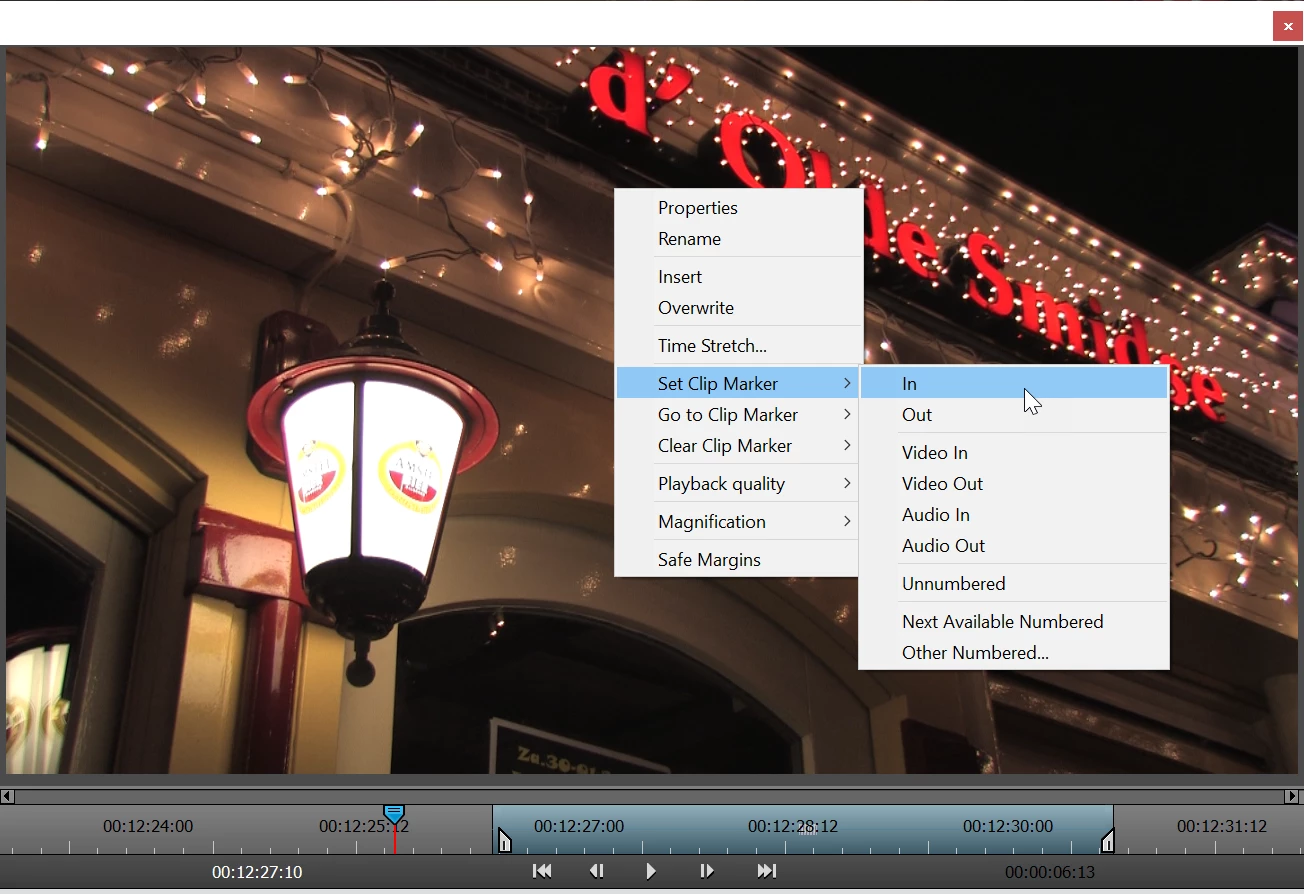
On Premiere Elements 2020, the in/out markers are no appearing on the preview window.  I can right click the clip and from there I can go to "set clip marker" but it's an extra step.  Anyone know how to get the markers to appear on the preview window?
This topic has been closed for replies.
Correct answer Ann Bens

OK got it: they are gone as you already gathered.

Rightclick on the window instead.

You can even set your own keyboard shortcuts for this.


2 replies

Participant
May 1, 2020

Hi Ann:


Thanks very much for your reply.  I very much apprecaite it.  I am aware of the sliding markers, however, I am looking for the fixed in/out icons that will set the in and out where the curser is.  I have attached another photo showing my previous version of Premiere Elements that shows the in/out marker icons on the preview page just below the time code, rewind, play/pause, and fast forward icons.  Do you know how I can get those to appear? 

Ann Bens
Community Expert
Ann BensCommunity ExpertCorrect answer
Community Expert
May 1, 2020

OK got it: they are gone as you already gathered.

Rightclick on the window instead.

You can even set your own keyboard shortcuts for this.


Participant
May 1, 2020

OK ... thanks very much.  Seems like a step backwards for Adobe on such a simple and useful feature.  I have set up shortcuts on the keyboard but it's an extra step for a commonly needed function.  Again, thank you for your help.  I do apprecaite it.

Ann Bens
Community Expert
Community Expert
April 23, 2020

Just double click on the clip in the Project Asset window.

It will open clip with in and out markers.

Participant
April 30, 2020

Thanks, but the markers are no longer there. Double clicking on the clip in the Project asset screen does open up the preview/edit screen but the in/out markers are not appearing like they used to on previous versions.  I'll attach a photo so you can see what I mean.  

Ann Bens
Community Expert
Community Expert
April 30, 2020