
johnm2879706
Participant
Nov 10, 2016 11:46 PM UTC
Answered

Insert blank slides in Element Premiere 15

I cannot seem to find out how to insert a blank side. The instructions do not seem to be for 15.  The product is on trial, I know it should perform the functions I want. The functions are similar to other video products on the market.

Thanks John
    This topic is closed to new replies. Start a new post to keep the conversation going.
    Bill SpragueCorrect answer
    Community Expert
    Nov 11, 2016 12:00 AM UTC

    I'm not sure exactly what you are looking for.

    Of course, one option is to create a blank photo in something like Photoshop or Photoshop Elements.

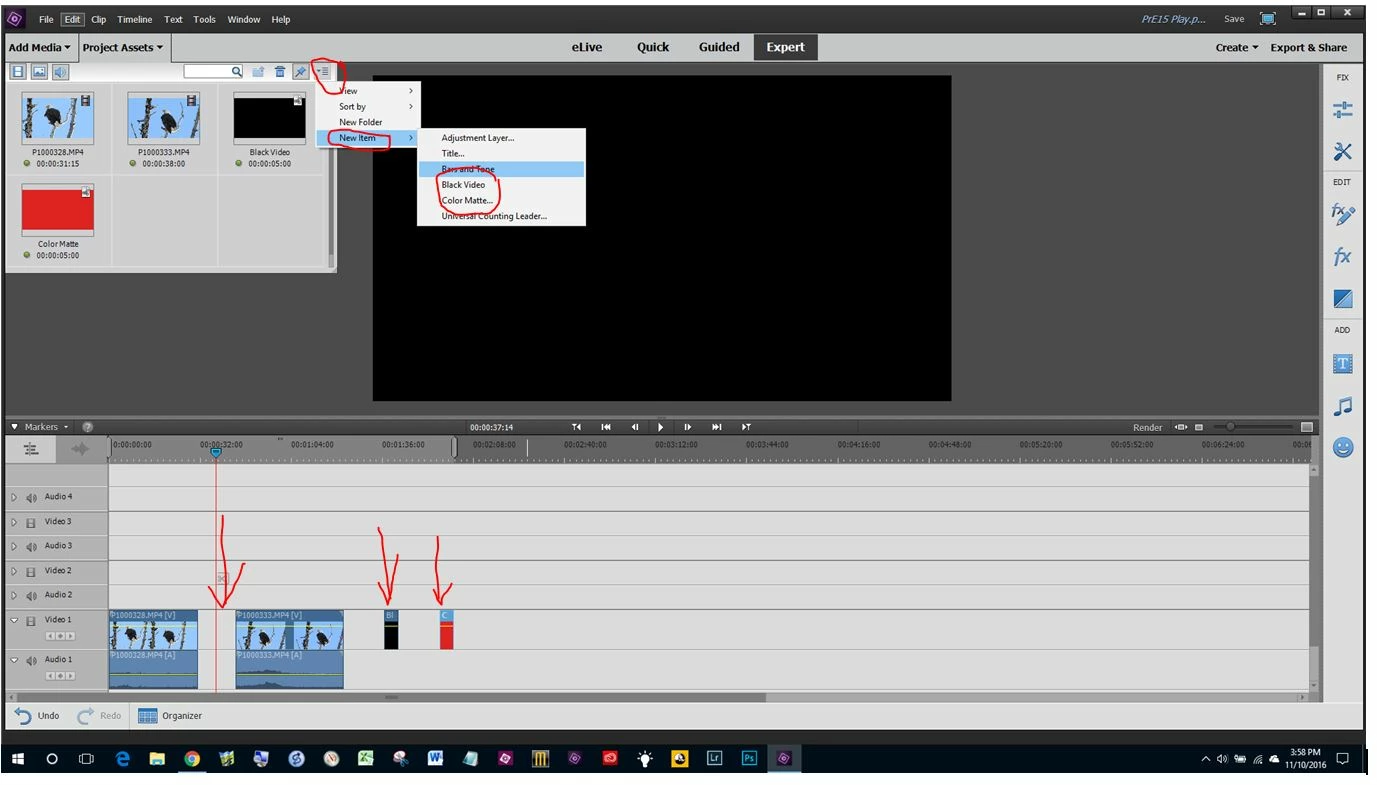
    Empty space can be created by dragging clips apart.

    Black video or a color matte can be created in the Project Assets Panel.   The color matte can be white, black or any color like red.

    3 replies

    Participant
    Aug 15, 2020 9:07 AM UTC

    If you are looking to add a blank space at the start of a project (as I was), probably the easiest way is to insert a new title from the title menu then delete it without closing the gap. 

    Translate
    Legend
    Aug 15, 2020 1:30 PM UTC

    Why not use Bill's method? It saves you time and clicks.

    Translate
    Bill SpragueCommunity ExpertCorrect answer
    Community Expert
    Nov 11, 2016 12:00 AM UTC

    I'm not sure exactly what you are looking for.

    Of course, one option is to create a blank photo in something like Photoshop or Photoshop Elements.

    Empty space can be created by dragging clips apart.

    Black video or a color matte can be created in the Project Assets Panel.   The color matte can be white, black or any color like red.

    Translate