


Inspiring
May 27, 2026
Answered

inserting a videoclip into a video timeline

  • May 27, 2026
  • 1 reply
  • 18 views

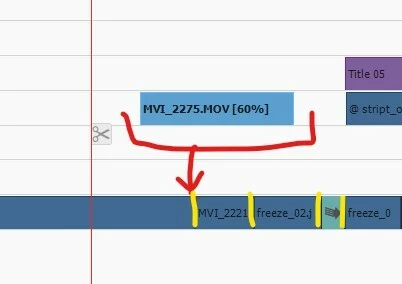
In Premiere Elements 2024 for Windows, how I can insert a videoclip between
other two without overlapping.

I have tried two methods, but both failed :  I drag and drop the videoclip into the desired position while I keep pressed the Control  key  or  Control+Shift


    Correct answer Angel Llacuna

    I finally got the solution, which is very subtle :  I shoud rtelease the Control key before releasing the mouse. Thanks for writing.

    1 reply

    Legend
    May 27, 2026

    Assuming those yellow veritical lines in your illustration are actual breaks in the video, it should work. The Insert command won’t break the clip on Video 1 on its own.

    Angel LlacunaAuthorCorrect answer
    Inspiring
    May 27, 2026

    I finally got the solution, which is very subtle :  I shoud rtelease the Control key before releasing the mouse. Thanks for writing.

    Legend
    May 28, 2026

    Nice detective work, Angel! Glad you worked it out.