berriz44
Participating Frequently
October 16, 2021
Question

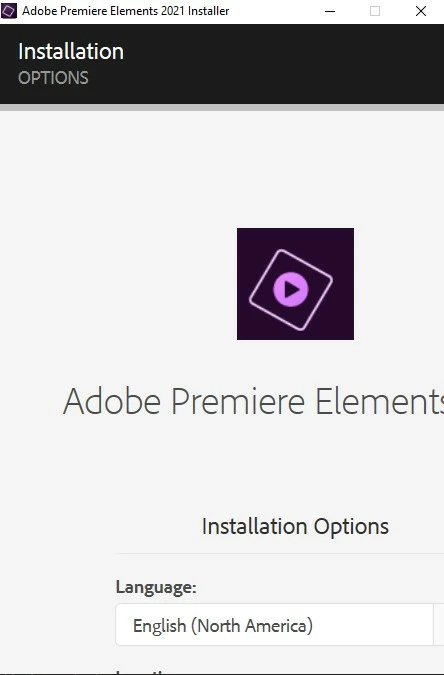
Installation panel does not show in full

  • October 16, 2021
  • 3 replies
  • 833 views

There is this bug in the installer that doenst show the full installer: 
This topic has been closed for replies.

3 replies

Adobe Employee
March 11, 2022

Hi there,


This might be due to display resolution, Please try troubleshooting the issue using below mentioned steps : 

1. Open Start menu and select Settings.

2. Go to System.

3. In Display, check the Scale and Resolution options and adjust them to make your screen look proper. (Setting to an option labeled (Recommended) is often the best choice)

4. If you make a change, you'll be asked to make sure you can still see what is on the screen. If it looks proper, select Keep changes, otherwise, select Revert 

5. Now, launch the Adobe Premiere Elements Installer to see if you are able to install now.


(You may revert back the Display changes after installing Premiere Elements, as per convenience)

Hope this helps resolve your issue.


Regards,

Divy Jain

berriz44
berriz44Author
Participating Frequently
October 21, 2021

sorry for my bad english uwu

Ann Bens
Community Expert
Community Expert
October 16, 2021

Make sure your windows display is set to 100%.

berriz44
berriz44Author
Participating Frequently
October 18, 2021

How?

Ann Bens
Community Expert
Community Expert
October 18, 2021

If you dont know how you most likely never changed the setting.
