


Known Participant
October 18, 2021
Question

Is there an easy way to adjust Keyframe Time?

  • October 18, 2021
  • 1 reply
  • 223 views

Is there a command or button to copy a keyfrrame length from another keyframe? 

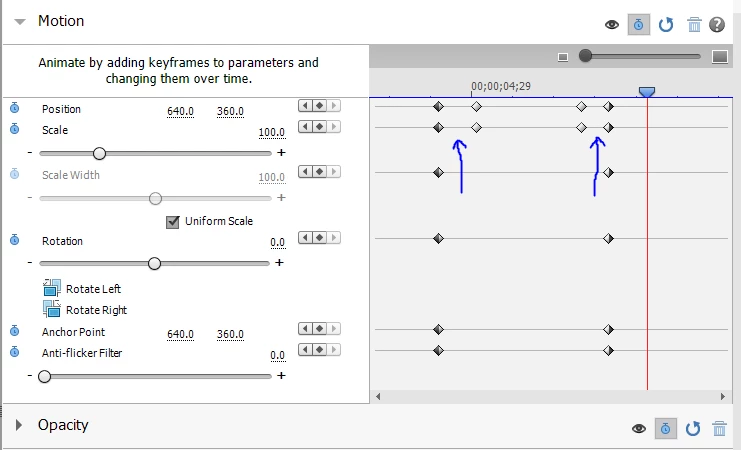
What I mean is, I want to zoom in on piece of my video. The time it takes to zoom in from the start of the zoom to end zoom is 1 second (or however long). I then hold the zoom for however long I want it. Then I unzoom and I want my unzoom to also take 1 second from the start of the unzoom to the end of the unzoom. Currently, I have to eyeball the time to zoom in and zoom out. Is there a simpler way? 


In the image, I want the time to be the same where both arrows are pointing. 


This topic has been closed for replies.

1 reply

Legend
October 18, 2021

You can lasso keyframe points by dragging over them, then right-click and Copy them, then right-click and Paste them. Duplicating a set of keyframes will create the hold you're trying to create. 


If you understand keyframe interpolation, you can also right-click on any keyframe point and select Temporal Interpolation, where you'll find options for holding a certain setting until the next keyframe.


But in your case, I think copying and pasting is the simplest way to avoid having to "eyeball" the settings.