
Participant
August 11, 2022
Question

Issue with audio 5.1 files

  • August 11, 2022
  • 1 reply
  • 817 views

Hi,

With PE21, I use .MTS files recorded in 1080p and audio 5.1 with my camcorder. With PE21, I create a project AVCHD with audio 5.1, and PE21 creates an audio Track 1 which is 5.1.

When I insert my 5.1 MTS file into the timeline, instead a putting the audio just on the Audio Track 1, PE21 puts the audio on 6 tracks (cf. attached picture).
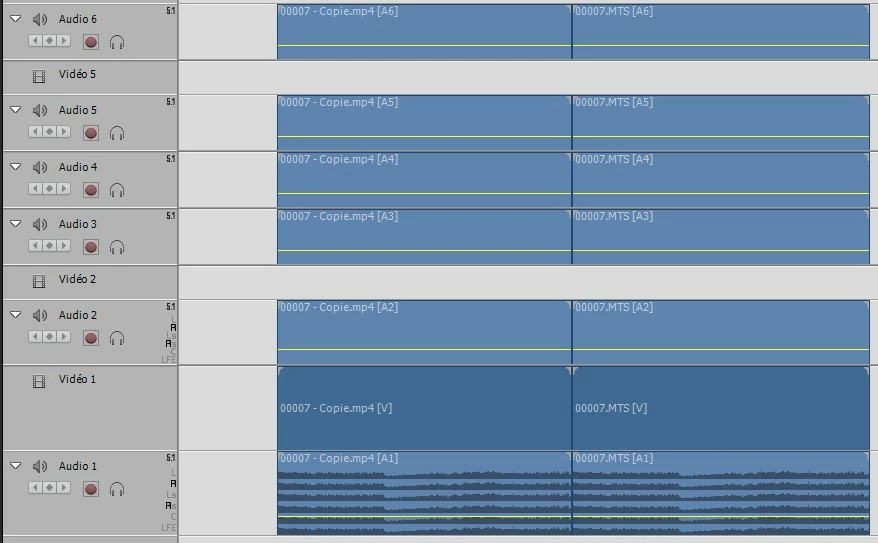
I made the same thing with an audio 5.1 mp4 file, and I had the same issue

How to fix that ?

Thx

This topic has been closed for replies.

1 reply

Legend
August 11, 2022

Despite Premiere Elements appearing to have project settings for working with 5.1 audio, the program just doesn't seem to be able to do it anymore. 5.1 audio almost always leads to buggy behavior.


I'd recommend sticking with stereo if you plan to edit in Premiere Elements. (I can show you how to easily convert these videos to stereo.)

Community Expert
August 11, 2022

Yes please!  What is your preferred way to convert 5.1 to "stereo" Steve?  Thanks.