



Question
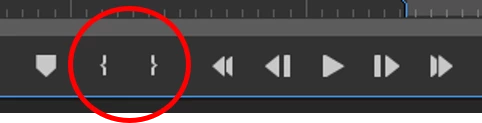
Keyboard shortcuts for 'Mark In' and 'Mark Out' missing from Adobe Premiere Elements 2025
Hello Editors, I have recently upgraded from Adobe Premiere Elements 2015 to 2025 and I can see there are some great enhancements in this version. For some reason I'm unable to assign keyboard shortcuts to 'Mark In' and 'Mark Out' buttons of Source Monitor. The default 'I' and 'O' keys don't work. I couldn't find 'Mark In' and 'Mark Out' in Keyboard Customisation option. I have looked into some community discussions and they are having the same problem with Premiere Pro, not Premiere Elements. I tried some of their suggestions but nothing worked. Hoping to get some help here otherwise I might have to return this software and ask for refund. I cannot imagine editing without this keyboard shortcut. Thanks.
 AdChoices