


Keyframe.h-142 Error And Excellent! Adobe Customer Care
Corrupted files with Premiere Elements are an ongoing problem for years as far as i realized. This is the first time i experienced this problem. With no actual reason my previously saved file was not opened, along with all the backup files. This is the error i have been getting:
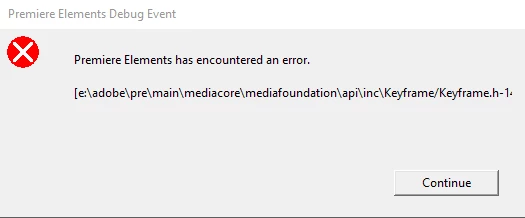
Actually Adobe has a solution for this error: Keyframe.h-142 error | Opening projects
I followed the steps here, and generated a new file. However this new file was not opened either by PE with a new error message: "An unknown error occured while opening the project."
What i had to do was contacting the "Adobe Customer Care". I was told that my file is corrupted, and there's nothing to do. The worst part was the disappointing technical staff. I think that was the worst customer care experience i have ever had.
So i decided to try my chance in the forums. Does anybody have any idea how to rescue this file?
What i had to do was contacting the "Adobe Customer Care". I was told that my file is corrupted, and there's nothing to do. The worst part was the disappointing technical staff. I think that was the worst customer care experience i have ever had.
PS: This is the transcript of the chat session:
P*********: Hello! Welcome to Adobe support.
P*********: May I please know your operating system and the version of Elements you are using?
Me: Hello
Me: Windows 10 and Premiere Elements 15
P*********: Please allow me 1-2 minute(s) to review your account details.
Me: Yes,of course.
P*********: may I know have you already tried this article?
P*********: https://helpx.adobe.com/premiere-elements/kb/keyframe-h-142-error-opening.html
Me: Yes. I have tried it, and generated a new prel file with a new name. But PE still won't open it.
Me: "An unknown error occured while opening the project."
P*********: In that case it appears the the project is corrupted and I am afraid that it can not be retrieved.
Me: This is absolutely shocking, because i successfully saved the file. And when i tried to open it again, i learned that it's corrupted?
Me: Can i learn what could have caused the corruption?
P*********: Well the cause could be the sudden shut down of the computer, improper closing of Premiere Elements.
Me: Well, none of these happened.
Me: Dear P*********, is there a possibility that i could send the file which is only 350 Kb, and the technical staff could check it?
Me: I spent hours for this, and this is a terrible situation.
P*********: Well the file can not be retrieved though.
Me: Auto-saved files are corrupted as well
Me: And no explanation for this?
< No response... Chat session suddenly ends.>
 AdChoices