
Known Participant
February 8, 2023
Question

Layers of Color Bands in Sony a1 Footage

  • February 8, 2023
  • 4 replies
  • 1493 views

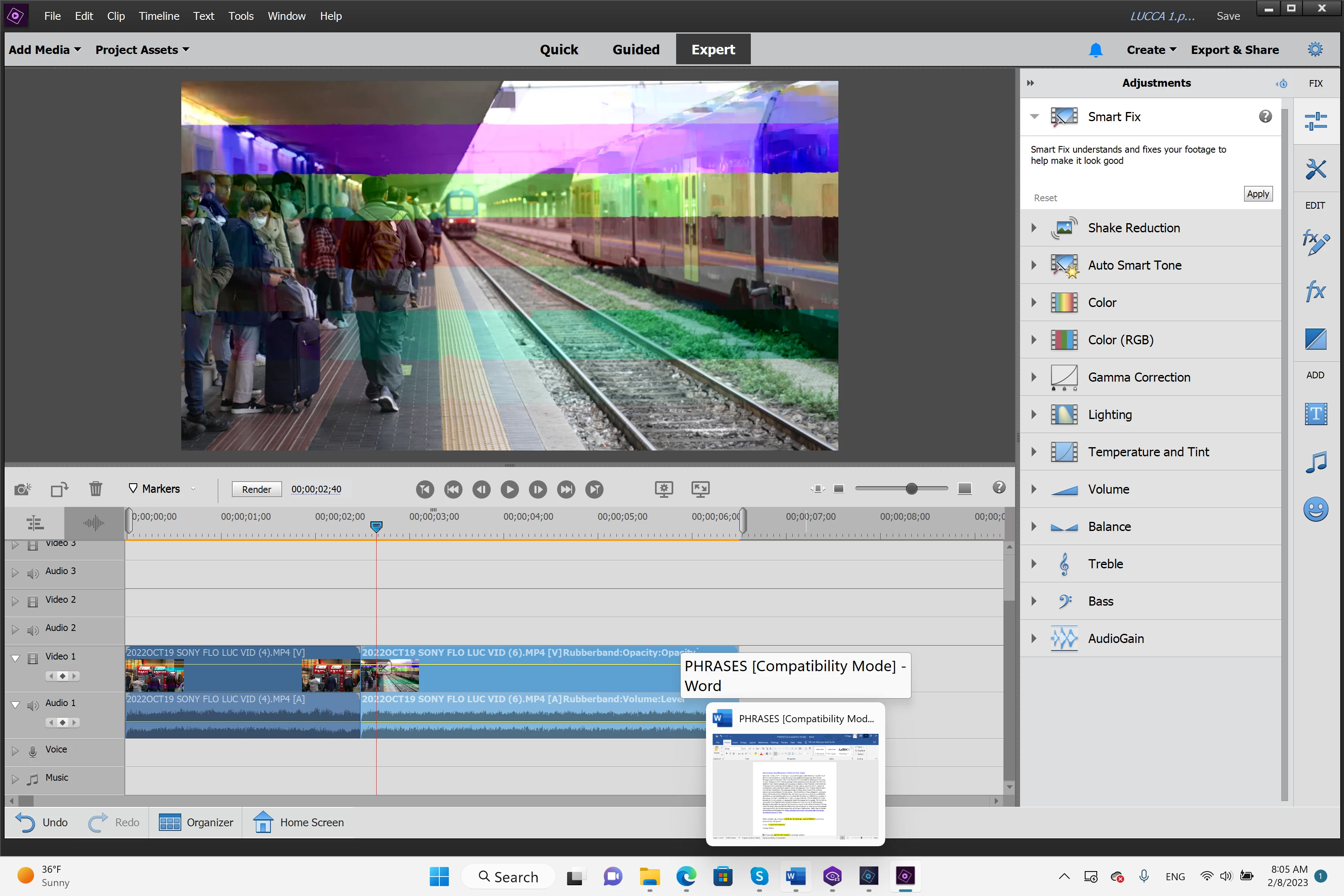
Hi, I encountered a new problem with Sony a1 footage and don't know how to correct this. Hope the gurus can help me, PLEASE. I am still using PE 2020 Window version and never had an issue with Sony a1 footage until yesterday when I noticed layers of color bands -- red, green, blue, violet ... -- suddenly appearing on top of each footage. Please see attached snapshot. All sony clips are auto-captured as Rec 709. I uninstalled/re-installed the program and problem didnt go away. I tried using another computer but also showing same problem. How to correct this issue? Please help. Thank you for your time and patience. 🙂 

TS
 

This topic has been closed for replies.

4 replies

TS5EADAuthor
Known Participant
February 13, 2023

I am still pulling hairs here. Please look at the attached screenshot closely. The red color band as seen in this video clip is not a plain straight color band. It followed the curve of the left wall to the steps to right wall. Any idea what's going on here? I thank you so much for your input. 

Ts

Ann Bens
Community Expert
Community Expert
February 13, 2023

You will have to convert the footage as I think it's in the source (as codec?) as the same issue occurs in DaVinci.


Upload a clip for testing!

TS5EADAuthor
Known Participant
March 1, 2023

How to convert the footage? I've one huge sample file,  > 47MB in my Google Drive. Dont know how to share this with you. Thank you. 

Peru Bob
Community Expert
Community Expert
February 10, 2023

Are you using the NVIDIA Studio driver (and not the Game driver)?

TS5EADAuthor
Known Participant
February 10, 2023

Studio, not gaming

Ann Bens
Community Expert
Community Expert
February 8, 2023

Uncheck Hardware acceleration.

TS5EADAuthor
Known Participant
February 8, 2023

Thank you, Ann. Where can I find this? I looked around and couldnt find it. Thank you. 

TS

John T Smith
Community Expert
Community Expert
February 8, 2023

Do not count on Windows to be fully up to date when it comes to device drivers
Go to the vendor site to be sure you have an updated driver for your graphic adapter
.
nVidia Driver Downloads https://www.nvidia.com/Download/index.aspx?lang=en-us
-for all Adobe programs use the STUDIO driver, not the GAMING driver
-To achieve the highest level of reliability, Studio Drivers undergo extensive
-testing against multi-app creator workflows and multiple revisions of the top
-creative applications from Adobe to Autodesk and beyond
528.24 1-23-23 https://www.nvidia.com/Download/driverResults.aspx/198731/en-us/
.
If you have a laptop you MAY also need to check for a laptop specific nVidia driver
-SOME laptops require an approved driver from the laptop company, not nVidia
.
AMD/ATI Driver https://www.amd.com/en/support
.
Intel https://downloadcenter.intel.com/product/211969/Intel-HD-Graphics-Family

TS5EADAuthor
Known Participant
February 8, 2023

Thank you, John. Updating didnt help. I updated from NVDIA Graphic 462.59 to latest 528.49. The color bands still persist. The problem started when I was playing with the Auto-Color in Color Adjustment panel to see how that footage would look like. When I didnt like the outcome and reset it, those color bands stay, and the rest of my Sony clips are now also color-banded. Do you have any other ideas how to resolve this issue? I'm stuck and cannot proceed with my family vacation project. I thank you so much for your help.  

TS