


Participant
March 8, 2020
Question

MP4 files from Panasonic Camcorder missing audio at end of files.

  • March 8, 2020
  • 1 reply
  • 267 views

I have files from my Panasonic HC-VX981 that are missing audio from the end of the clips. It's not all clips, just random ones and there seems to be no consistency in the amount of audio that gets truncated. If I watch the clips the audio is there?
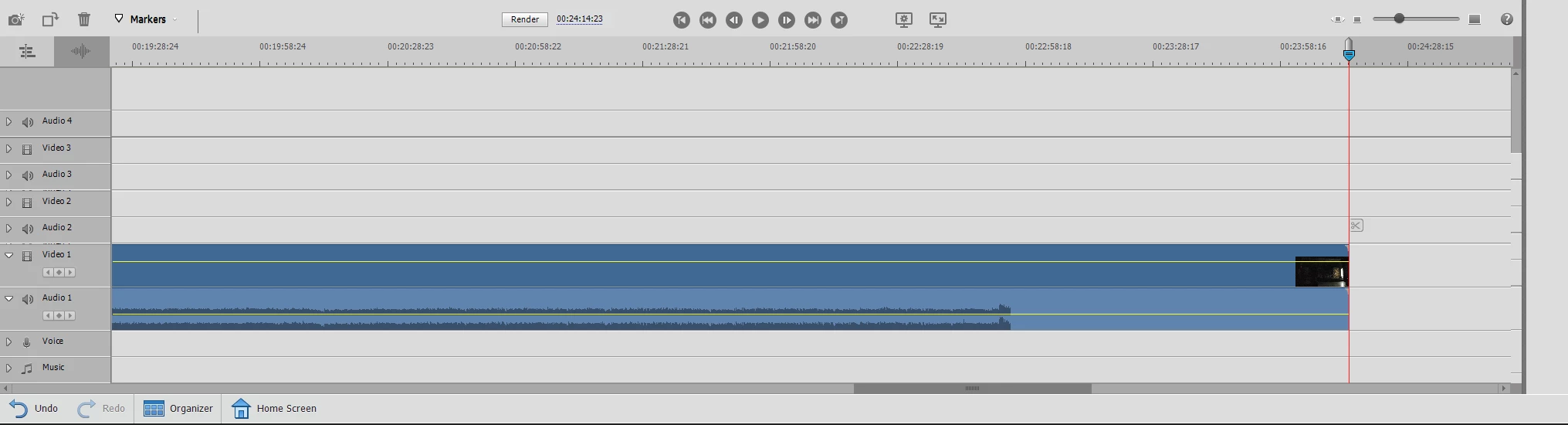
Attached a screen capture of one of the clips. Can't seem to figure out why this is happening all of a sudden. I did do the latest update recently, this is the first video I'm trying to edit after doing the upgrade.

    This topic has been closed for replies.

    1 reply

    Legend
    March 9, 2020

    This usually happens when you've not let the video conform before you've started editing it.

    Changing the name of the video file will trick Premiere Elements into thinking it's the first time it's seen the file. When you import it into a Premiere Elements project be sure to wait until the program has completely conformed the video before start editing. The screen capture you posted above is too small for me to see how long your video clip is, but a longer video clip can take a few minutes to conform. You should be able to watch its progress in the lower right of the program.

    Participant
    March 9, 2020

    Steve,


    Thanks for the information. Unfortunately that doesn't appear to be the issue. I renamed the files and added them to a fresh project. In the bottom right I saw that the files were going through the conforming process. I waited until that completed for all of the files and when I added one of the files the issue still persisted. I uploaded another picture. The video clip in this instance is 6 minutes and 39 seconds long.

    Legend
    March 9, 2020

    Sorry. I don't know why else that would happen. as long as you've moved the video files to your C drive from the camcorder.