
Participant
March 6, 2022
Question

My files keep being corrupted!

  • March 6, 2022
  • 2 replies
  • 333 views

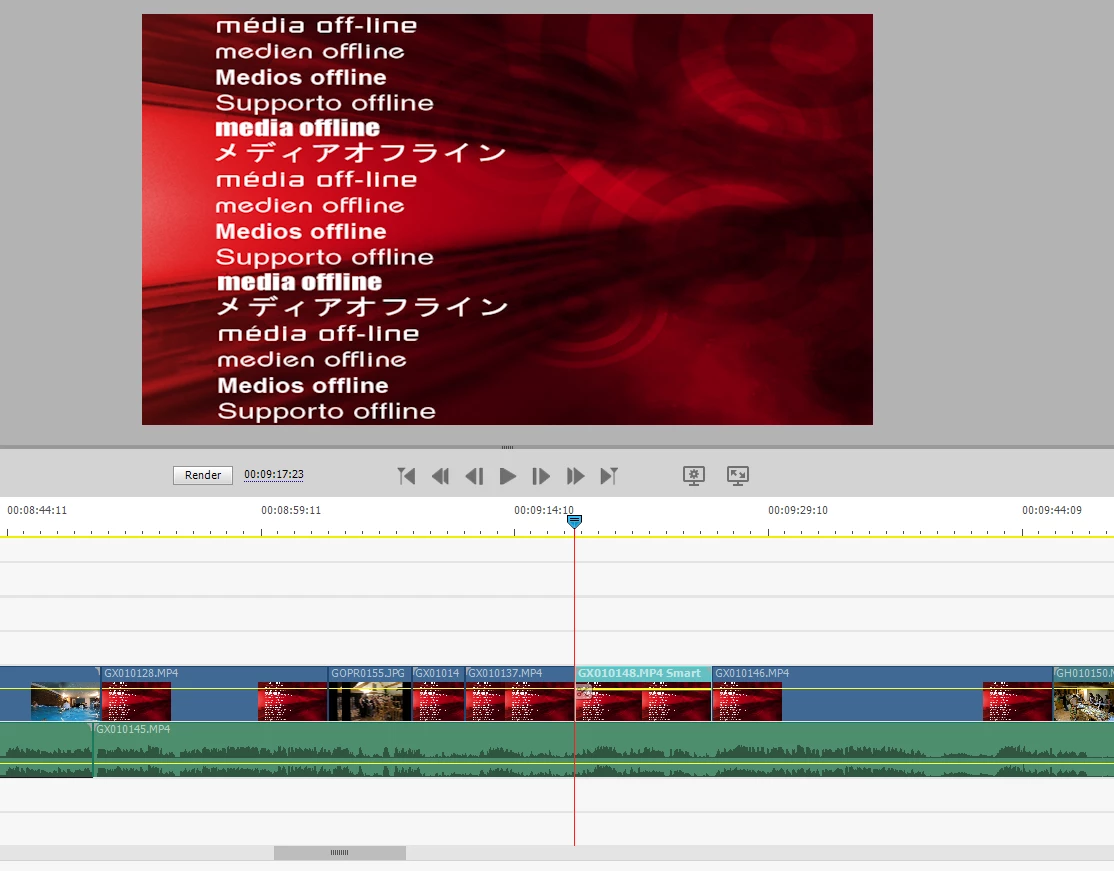
I spend hours creating a video on Adobe Premiere Elements... when I save it, exit and then go back into it, several of the videos then appear with this error message (see picture). I don't know why it is doing it and I have to start all over again, only for it to continue happening every time I have to exit the video. 

Please someone help and tell me why this is happening! I'm so angry!!!
This topic has been closed for replies.

2 replies

Peru Bob
Community Expert
Community Expert
March 7, 2022

To add to what Ann Bens said:


Premiere Elements project files do not contain the media used in the project.  They act as a shortcut to reference the media as needed.  If the media files are not where Premiere Elements was originally told they are, then you will get that missing media screen. 


If using an external drive on Windows, make sure that the drive your media is on has a fixed drive letter assigned.

Ann Bens
Community Expert
Community Expert
March 7, 2022

And to add what Bob said:

If you are editing off a sd card, copy content to hdd first then add to Elements from the hdd.

Ann Bens
Community Expert
Community Expert
March 6, 2022

Your file is not corrupt but as the text shows: Off Line.

Are your files on an external drive which is disconnected?

Or editing straight from the sd card?