


Inspiring
October 31, 2017
Answered

My video is tilted

  • October 31, 2017
  • 2 replies
  • 585 views

With two bubble levels on my gear I believed the one on the tripod  and not the one on the fluid head (first time for this new head) and it was wrong. My two hour video is tilted to the left. Is there any way to level streaming video in PE13 or other version?

Thanks!
    This topic has been closed for replies.
    Correct answer Bill Sprague

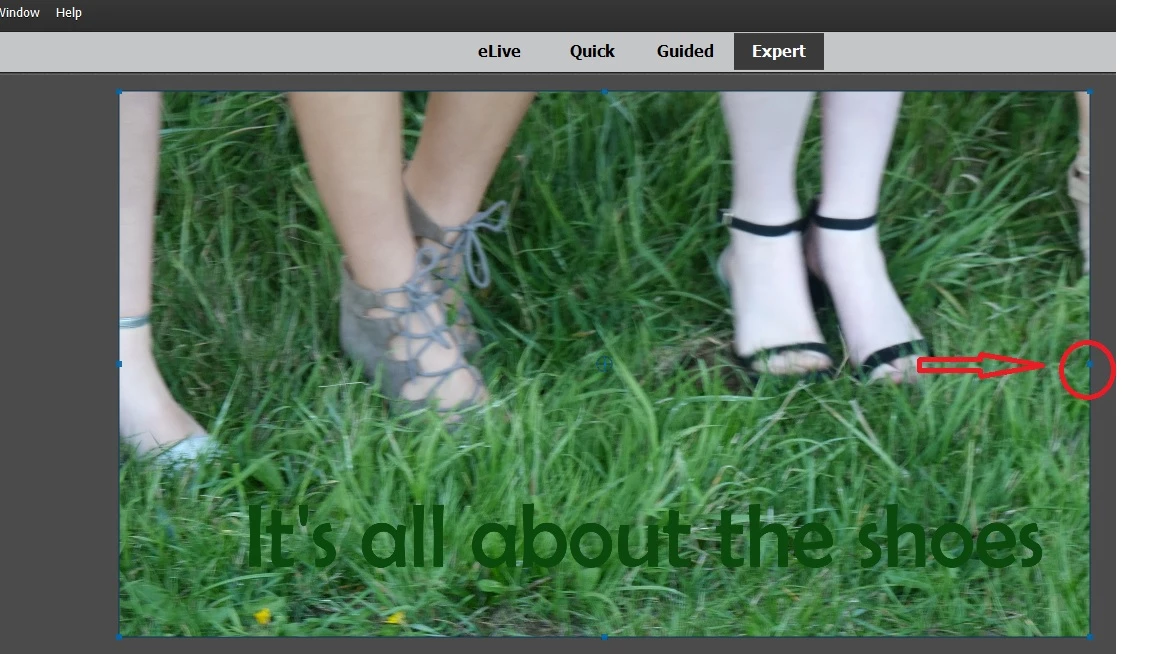
    The easiest way I know is to select the clip, click in the center of the preview monitor and a blue outline with blue dot handles appear. 

    Hover the mouse to the right and outside of the blue rectangle and a curved double headed arrow appears.  That will rotate the screen.  I can't seem to get a screen shot of the double headed arrow,but it will appear inside of where the red circle is.

    2 replies

    Peru Bob
    Community Expert
    Community Expert
    October 31, 2017

    You may need to increase the scale slightly when you rotate the video to eliminate black areas.

    Legend
    October 31, 2017

    You can certainly rotate your video as little or as much as you need to.

    I don't know that that qualifies as "level streaming video", but you can do it.

    Bill SpragueCommunity ExpertCorrect answer
    Community Expert
    October 31, 2017

    The easiest way I know is to select the clip, click in the center of the preview monitor and a blue outline with blue dot handles appear. 

    Hover the mouse to the right and outside of the blue rectangle and a curved double headed arrow appears.  That will rotate the screen.  I can't seem to get a screen shot of the double headed arrow,but it will appear inside of where the red circle is.

    HangerbumAuthor
    Inspiring
    November 2, 2017

    You know I was poking around in the video prior to my post trying just this technique without success. I bet it was in my procedure... I'll go back and pursue it further and let you all know how it works out.... many thanks!!