


No Audio Display or Sound - Premiere Elements 2021
Installed Premiere Elements 2021 on 12/1 and although I can import files (seems slow)-audio track is showing "blank" even though the clip has audio. When played there is no sound.
Background and trouble shooting so far. Ideas/suggestions would be appreciated.
-Using a 3 month old Dell XPS Workstation, Windows 10 OS, operating system and drivers up to date.
-Until I "upgraded" was using Premiere Elements 2018 (still have it installed on the workstation)
-Verified video clips (tested several) work in Premiere Elements 2018 with no problem. Can edit - there is audio - and the audio is displayed - all good. After editing can export.
-Here is one of the same video clips in PE 2021 - shows no audio on the video clip.
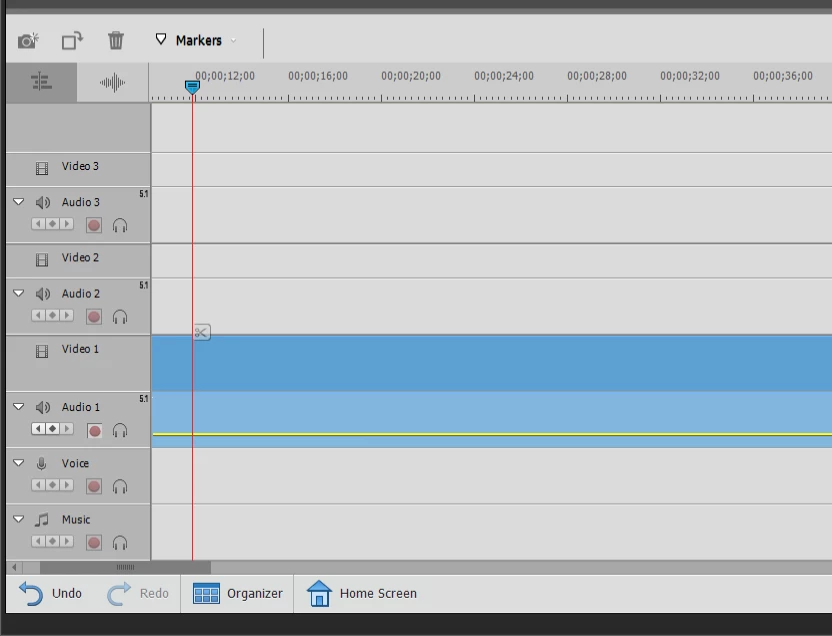
-In Premiere Elements 2021 changed the Audio Hardware Input default to none (originally the app. picked up the Yeti mic that was attached but the audio section was showing no audio). Closed and tried again. No luck.
-Removed the check for the Hardware Accelerator Option under Audio - Closed and tried again. No luck. Added the check back.
Since my video clips works in PE 2018 and PE 2018 shows the audio track with the audio so that I can edit it and the clips work with other video players, something is not set up right with PR 2021. I just can't figure it out.
Any ideas?
Thanks for your help`.
 AdChoices