


Participant
August 24, 2017
Answered

No audio keyframes

  • August 24, 2017
  • 2 replies
  • 862 views

Premier Elements 13.1, Mac OS 10.12.6

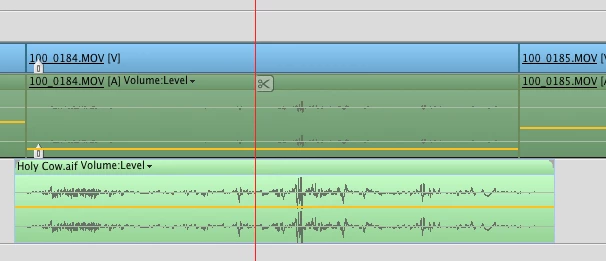
  I can only change audio levels on an entire audio clip. Is there no audio key framing in this version? This screen shot shows my work around. I exported the audio track. Edited it. Dropped it into the timeline with no volume on the camera original audio.

  Please tell me I'm wrong and I just can't find the key frame function. Apps I have worked on: Premier, Media 100, Final Cut Express, Final Cut Suite, Avid Media Composer.

Cheers,

Bill Gorry
    This topic has been closed for replies.
    Correct answer Steve Grisetti

    Of course there is audio keyframing!

    But it doesn't look like you tried to create keyframes.

    Did you select an audio track and the click the Create Keyframes button on the track header?

    2 replies

    Legend
    August 25, 2017

    Please mark this question as correctly answered, Guaire.

    Steve GrisettiCorrect answer
    Legend
    August 25, 2017

    Of course there is audio keyframing!

    But it doesn't look like you tried to create keyframes.

    Did you select an audio track and the click the Create Keyframes button on the track header?

    GuaireAuthor
    Participant
    August 25, 2017

    Steve - Right, I didn't try to make a keyframe. You can't try to do what you can't do. I tried looking around the interface. There was no screen shot for that.

      I got to the buttons on the track header and made my keyframes. Thanks for doing what the help menu and tutorials couldn't do.

    Cheers,

    BG