

venajoe
Inspiring
February 28, 2022
Answered

No audio playback in Premiere Elements 2018

  • February 28, 2022
  • 2 replies
  • 1478 views

I've been happily editing using Premiere Elements 2018 for the past several years.  Last week I created a new project, and when I tried to play some clips, no audio!  My audio hardware is working fine with YouTube videos, system sounds, etc.  Looked for settings in PE that would affect this, but couldn't find any.  Then PE started behaving erratically--clips wouldn't play at all, certain commands did nothing.  When I tried to close it, it seemed to stop responding entirely.  After experiencing this several times, I decided to delete it and reinstall it.  Today I did so, but no joy, as the new installation is behaving exactly the same!  Is there a timer on this software that just makes it dysfunctional after a certain amount of time?  I was a reasonably happy PE customer until now...


You need to ask program questions in the forum for the program you are using
To ask in the forum for your program please start at https://community.adobe.com/
Moving from Using the Community (which is about the forums) to the correct forum... Mod
This topic has been closed for replies.
Correct answer venajoe

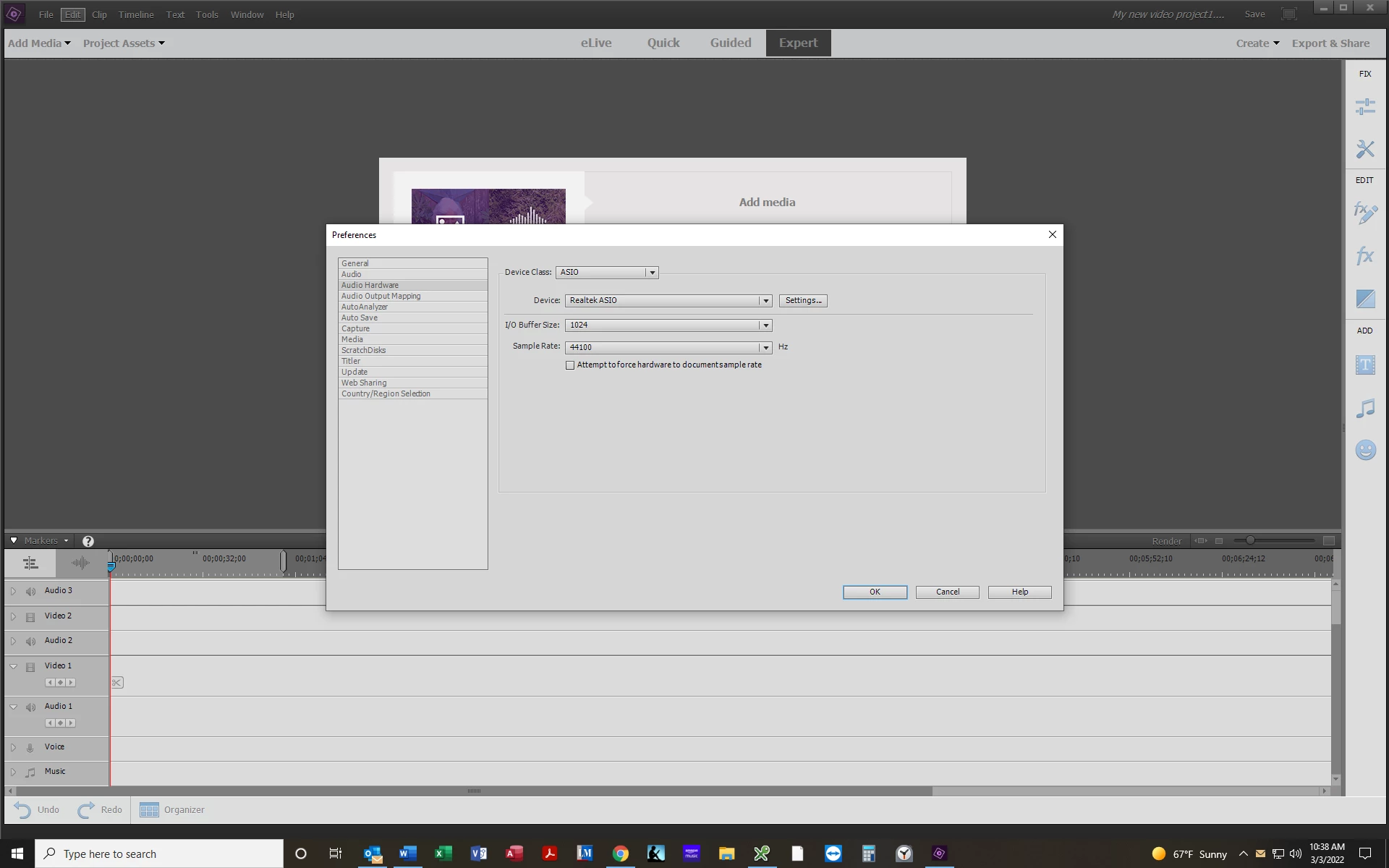
Tried re-installing it yesterday.  I still get an error message at the end of the installation, saying that some components couldn't be installed.  Once again, I can't open the log file with a text editor, as only junk characters appear so I can't read the error code to get a heads-up how to proceed.  Still not playing back any audio, and still no Default Input field on my Preferences Audio Hardware page.  Here's a screen shot: 

Meanwhile, I checked my Premiere Elements 2018 on my laptop at home, and it is working perfectly, which is great, but that does not solve my problem of not being able to install it on my PC at work--where I do most of my editing during lunch!  Can anyone help me?!?


After spending a couple of weeks trying to resolve this issue with PE 2018, I was forced to move on, as no further replies were forthcoming from the community.  I consulted with a friend who is much more conversant with computers than I am, and he intimated that Windows could have pushed out an update that rendered certain features non-compatible.  After numerous unsuccessful attempts at reinstalling, I finally had to give up on this version.  After carefully checking that my work PC fully met all the required specifications for the installation of  PE 2022, I purchased, downloaded, and installed it, and--guess what--it is working perfectly.  I am glad that my problem has been resolved, and I can resume editing videos for my YouTube channel, but I certainly am disappointed that this product just seemed to stop working without remedy after abour five years' use.

2 replies

Community Expert
February 28, 2022

Along with Bob's requests and suggestions, consider checking the Audio Hardware Preferences.   Default Audio Input should be set to "No Input".   For some reason, if it is not matched to your computer correctly the entire system bogs down as it tries to process the audio. 

venajoe
venajoeAuthor
Inspiring
February 28, 2022

There is no option for selecting an input option in my Audio Hardware preferences.

Community Expert
February 28, 2022
quote

There is no option for selecting an input option in my Audio Hardware preferences.

If it is there, it should look like this....

Peru Bob
Community Expert
Community Expert
February 28, 2022

What are the complete computer specs, including hard drives (how many, what kind, what is on each, what capacity, and how full)?

If NVIDIA graphics, make sure to use the latest Studio Driver from NVIDIA (NOT the Game Driver).

venajoe
venajoeAuthor
Inspiring
February 28, 2022

Device name ZDOG2Q6W8N2
Full device name ZDOG2Q6W8N2.CBN.Local
Processor Intel(R) Core(TM) i5-7500 CPU @ 3.40GHz 3.41 GHz
Installed RAM 8.00 GB (7.87 GB usable)
Device ID 5743E911-7973-47C9-BBB7-3A495D2E0DC4
Product ID 00329-10020-00002-AA057
System type 64-bit operating system, x64-based processor
Pen and touch No pen or touch input is available for this display


Edition Windows 10 Enterprise
Version 21H2
Installed on ‎1/‎13/‎2022
OS build 19044.1526
Experience Windows Feature Experience Pack 120.2212.4170.0


Only one hard drive: 464 GB; abourt 200GB used as present.  Not sure if it's SATA or IDE; it's not a SSD.  Don't know the manufacturer of the HDD.  Intel graphics 1920 x 1200, 59p refresh.


Funny thing is, I have been using this PC with the original installation of PE 2018 for years.  Nothing has changed on the PC, as far as I know.  I see many references to setting the input settings to none, but my Audio Hardware page doesn't include an input option.