
runar bg34655255
Participant
January 23, 2020
Question

No sound when importing AVI to Premiere Elements 2020

  • January 23, 2020
  • 3 replies
  • 602 views

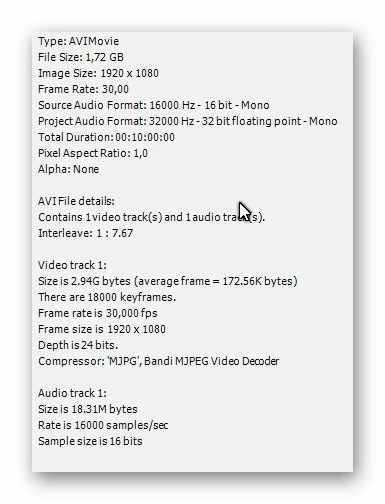
When importing an AVI video I get both a video and audio track. But when I play it in Elements I get no sound. The audio track also looks strange, just a lot of vertical thin lines. The video plays fine, with audio, in all other programs. I am also very sure that I used the same AVI file in PE 2019 earlier. Here is what the file properties says:
This topic has been closed for replies.

3 replies

Community Expert
January 26, 2020

"It comes from a small keycam." 


What keycam do you have?

With Premiere Elements, Adobe seems to try to cover the codecs from common, current, mainstream consumer cameras.  If you have footage from something else, it doesn't always work well. 


A common work around is to use the (free) program Handbrake to convert what you have to a more universal format for editing.    

runar bg34655255
Participant
January 26, 2020

I'm not sure about the name of the key-cam.
It's strange that PE is the only program that I have tried that can't handle this. Even free programs have no problem.
Yes, I know that I can convert it. But that takes way too long. It looks that the solution is to stop using PE and move to another program.

Community Expert
January 23, 2020

"It is already 'No input'."

Then this gets more complicated.  Playing files and editing files are different problems.  


And 'AVI', 'MP4' or any other video format is a container full of stuff, including codecs.  To figure out the actual audio codec you can use the (free) MediaInfo program.  Open up a detailed view, take a screen shot and post it here.


With a little luck, maybe another user here can figure it out. 

runar bg34655255
Participant
January 24, 2020

I can edit it - with sound - with 3 other programs that I have tried. 

Here is what I get from MediaInfo:

Community Expert
January 23, 2020

The most frequent sound issue here is the audio hardware settings.  Go to Edit > Preferences > Audio Hardware.  Try changing Default Input to anything other than what it is.  "No Input" is often a good choice.  

runar bg34655255
Participant
January 23, 2020

It is already "No input".