


Participating Frequently
January 28, 2021
Question

PE 2020 does not show monitor for a long time rafter inserting a project asset to the timeline

  • January 28, 2021
  • 2 replies
  • 586 views

After inserting a project asset PE2020 does not show the monitor. This can take several minutes. I think it happened after the last update. I can still save the project but clicking the play button has no effect.
It's very frustrating.
The same happens when I click the render button. Rendering starts with a dialog like this:
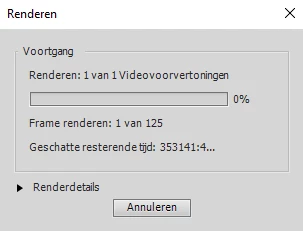
The estimated remaining time shows a very strange number and after a long time the real time is displayed and then the rendering starts.

Any help to avoid this is very much appreciated.

I'm running PE om Windows 10

kind regards
Reyer


This topic has been closed for replies.

2 replies

Ann Bens
Community Expert
Community Expert
January 28, 2021

Delete preview files and media cache and try again.

If that does not work reinstall Elements without the update.

ReyerAuthor
Participating Frequently
January 29, 2021

Deleting preview files and media cache had no effect.

Maybe this weekend I will reinstall Elements without the update.

Ann Bens
Community Expert
Community Expert
January 29, 2021

Your machine might be a little underpowered. Its 13 years old and running W10 latest version and probably highly compressed footage.


John T Smith
Community Expert
Community Expert
January 28, 2021

>think it happened after the last update


Update of what?


You need to provide details for anyone to help
Exact version of the Windows operating system
CPU brand and model and clock speed
Video adapter brand and model and driver version and amount of video ram
Number and size and type of hard drives
What kind of video are you editing?
-hint 4k video on an underpowered computer will not play well

ReyerAuthor
Participating Frequently
January 29, 2021

The update refers to a recent update of PE2020

Version of the Windows operating system:  Windows 10 Pro, version 20H2, build 19042.746

CPU brand and model and clock speed: Intel(R) Core(TM) i7-4770K CPU @ 3.50GHz  

Video adapter brand and model and driver version and amount of video ram: Nividia GeForce GT640, driver version 27.21.14.5671, Video RAM 10Gb

Number and size and type of hard drives: SSD drive 256Gb for OS, SDD drive 256Gb for PE2020 and traditional 4Tb drive for video files.

Kind of video: Mts and M2ts files.

With this system I had no problem till one month ago.