HOTELECHOMIKE
Inspiring
Dec 27, 2018 8:07 PM UTC
Answered

PE14: Moving Set of Keyframes in Sync

This one is probably for Steve...

PE14.1 on a WIN7 PC...

I've used Steve's method for drawing lines on maps (cropping from one graphic to another).

Now I'm trying a more complex route on a map that involves several "steps" - the route is not

a simple "crop from left to right" or "bottom to top":
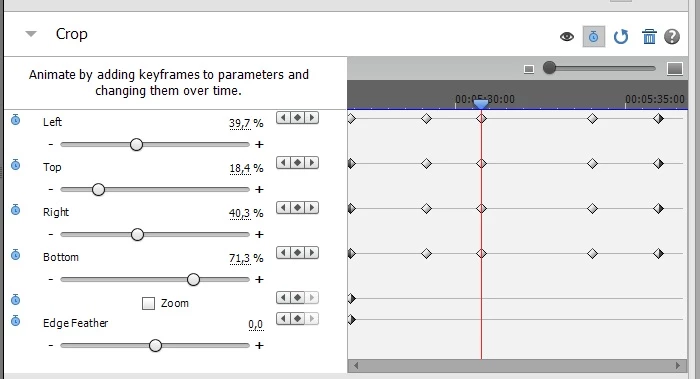
Now, its a bit tricky getting the intervals between the various steps in the timeline correct.

Assuming I wish to move the 4 keyframes through which the red timeline (above) goes a bit to the right,

is it possible to select the four so that they move together or do I have to move each one individually & hope

that they reappear in sync?

This topic is closed to new replies. Start a new post to keep the conversation going.
Ann Bens
Ann BensCorrect answer
Community Expert
Dec 28, 2018 10:23 AM UTC

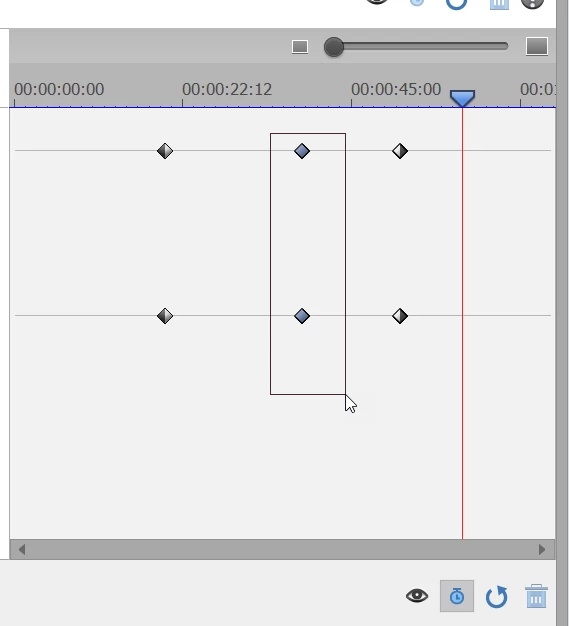
Lasso as in press left button mouse hold down and move mouse over keyframes.

5 replies

Ann Bens
Community Expert
Community Expert
Dec 27, 2018 8:58 PM UTC

Just lasso the keyframes and move them to the left or right.

Translate
HOTELECHOMIKE
Inspiring
Dec 28, 2018 7:38 AM UTC

Err - how (to lasso)?

By trail-and-error I Shift-clicked the first 3 & whilst still holding the Shift key with cursor over the 4th I found that moving the cursor left/right had the desired effect.  Is this what you meant?

Translate
Ann Bens
Community Expert
Ann BensCommunity ExpertCorrect answer
Community Expert
Dec 28, 2018 10:23 AM UTC

Lasso as in press left button mouse hold down and move mouse over keyframes.

Translate