



azadrumana
Inspiring
December 31, 2024
Answered

PRE2025 cannot remember 2 keyboard customisation
  • December 31, 2024
  • 2 replies
  • 202 views


Dear Community members,

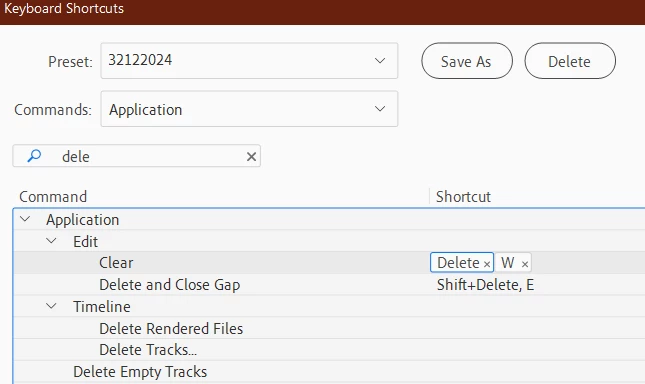
As you can see I have assigned W for clear and E for Delete & Close Gap, then saved the changes as 32122024. After I close PRE and open again, it do not remember them. It remembers all other customisations but not these 2.


Does anyone have any clue why this may happen and what I can do to fix this? 

Correct answer azadrumana

This is how I solved the problem (in case anyone needs).


I have customised everything I need then saved with a new name. Then I went into Documents\Adobe\Premiere Elements\25.0\Profile\Win and copied the file to my desktop while PRE2025 still open. Then I renamed the file to Adobe Premiere Elements factory defaults.kys and replaced it in C:\Program Files\Adobe\Adobe Premiere Elements 2025\Keyboard Shortcuts\en folder with the original one.


Folders may not be same based on your language etc. But my problem is solved. 

2 replies

azadrumana
azadrumanaAuthorCorrect answer
Inspiring
March 6, 2025

This is how I solved the problem (in case anyone needs).


I have customised everything I need then saved with a new name. Then I went into Documents\Adobe\Premiere Elements\25.0\Profile\Win and copied the file to my desktop while PRE2025 still open. Then I renamed the file to Adobe Premiere Elements factory defaults.kys and replaced it in C:\Program Files\Adobe\Adobe Premiere Elements 2025\Keyboard Shortcuts\en folder with the original one.


Folders may not be same based on your language etc. But my problem is solved. 

Ann Bens
Community Expert
Community Expert
December 31, 2024

Its one kbsc only.

azadrumana
Inspiring
January 2, 2025

I think you are not correct. 

Try this. Remove existing Delete and assign new key, save the change, close PRE and open again. If you find the new assigned key working, let me know. It always goes back to Delete key.