


Participant
November 4, 2016
Answered

Premier Elements 14.1 motion tracking error

  • November 4, 2016
  • 2 replies
  • 932 views

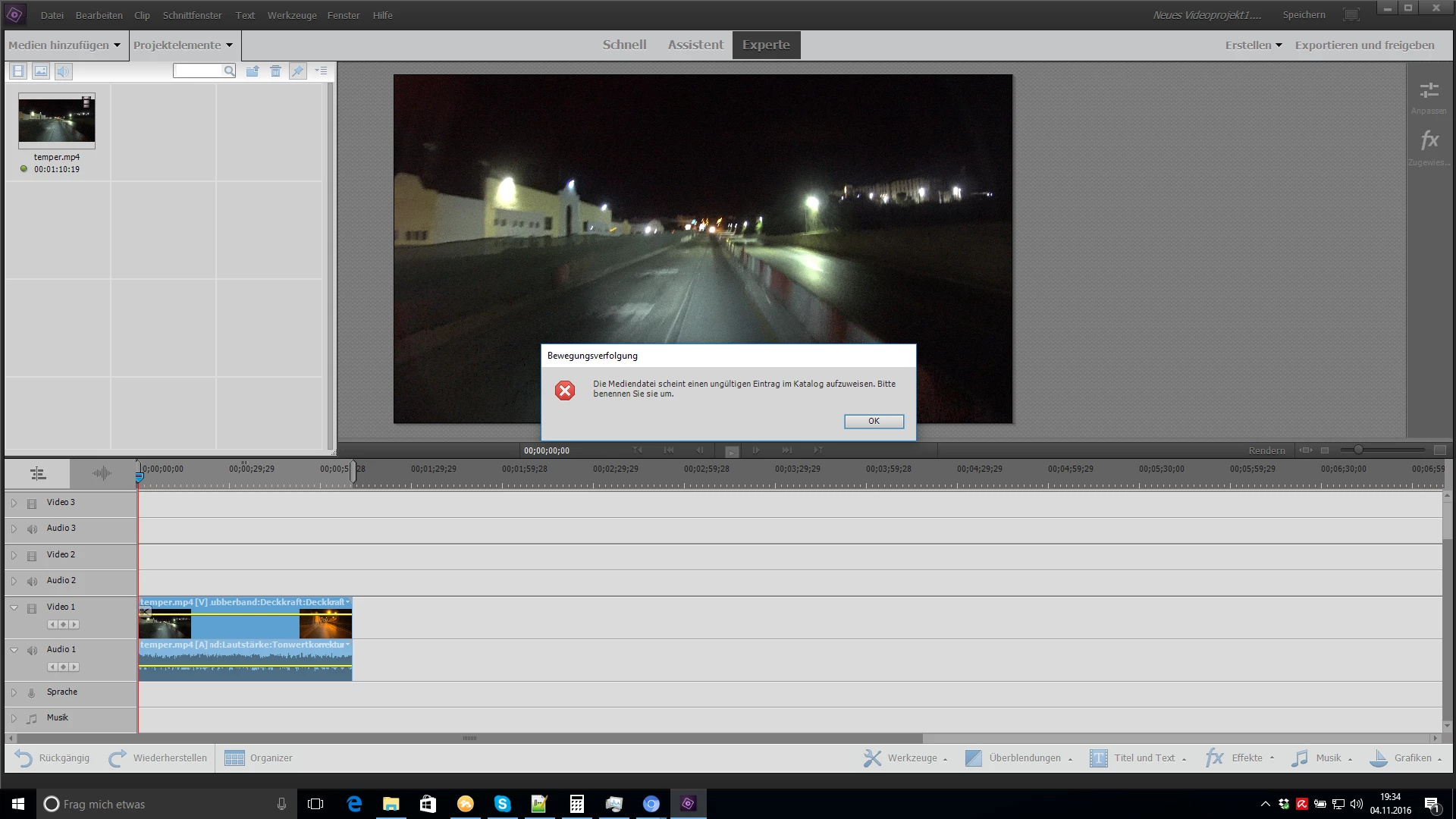
When trying to user the motion tracking tool I started getting the error "The mediafile seems to have an invalid entry in the catalog. Please rename it." This error started coming up after the update from 14.0 to 14.1 and it comes regardless what video file I use. In the attached screenshot I even used a video files which I rendered just upfront with Premier Elements for testing. Also renaming the file or just the clip doesn't work neighter, nor does it work if I start it in an all new project.


I run it on a Windows 10 64 bit machine and it used to work fine prevsiously. Hope anyone has any idea what is happening there. Ah just to mention all other tools like "Freeze the frame" or "Smart Trim" aso working fine.
    This topic has been closed for replies.
    Correct answer rw211

    Ich vermute, dass dieses Problem durch den Organizer verursacht wird.

    Fehlerbehebung bei Katalogproblemen | Organizer | Elements 6 und höher

    2 replies

    Legend
    November 8, 2016

    Based on what information you've given me, I don't know why this feature will not work.

    rw211Correct answer
    Participating Frequently
    November 8, 2016

    Ich vermute, dass dieses Problem durch den Organizer verursacht wird.

    Fehlerbehebung bei Katalogproblemen | Organizer | Elements 6 und höher

    Participant
    November 8, 2016

    Da war der Fehler. Danke. :-) Es haben zwar weder die Reparatur noch die Optimierung des Katalogs geholfen, aber einen neuen Katalog erstellen und den alten löschen hat funktioniert.

    Legend
    November 5, 2016

    What model of camcorder is this video coming from?

    Do you have Quicktime 7 installed, per the program's system requirements?

    Participant
    November 7, 2016

    Model of the camcorder is: Sony FDR-X1000V (XAVC S)

    But shouldn't matter in this case, coz the test clip I have in the screenehot is coming from Premier Elements 14.1 where I rendered it upfront to make sure it's not an issue with the file from the camcorder.

    Appart from that it happens now to any files, also from my mobile, other camcorder aso. And it used to work fine for files from the Sony one befor updating from 14.0 to 14.1

    Quicktime 7 was not installed, when I tried it out, since I didn't know it's a requierement. Now I installed the latest Quicktime 7.7.9, but unfortunatly still the same error.