



Premier Elements 2018 reverses system speaker output choice
Hello,
Running Premier Elements 2018 on my Win10 (Home) PC, I normally run my sound to my external Presonus AudioBox22VSL audio interface. I do this for all programs I am running. That is, from the system audio output choice, I switch from the default "Realtech(R) Audio" output to "AudioBox 22VSA" setting.
This works fine for all applicatons on my PC except for Premier Elements 2018, which reverses the speaker output choices. That is, in order to get the sound output to channel to my audio interface, I must select the default PC speakers (Realtech Audio). If the setting is set to the audio interface (AudioBox 22VSA) setting, the sound will come out of my default PC speakers. So I must change the speaker setting to be the internal "Realtech Audio" setting that will (strangely) send the audio output to the desired external audio interface instead.
Sure, this "workaround" works but it's a real pain in the backside. I often jump back and forth between my DAW (Digital Audio Workstation) software and Adobe PE Elements software. Every time I do so, I must manually switch my speaker output to assure my audio output will go to the audio interface.
What's going on here? Why does Adobe PE2018 reverse my speaker output settings?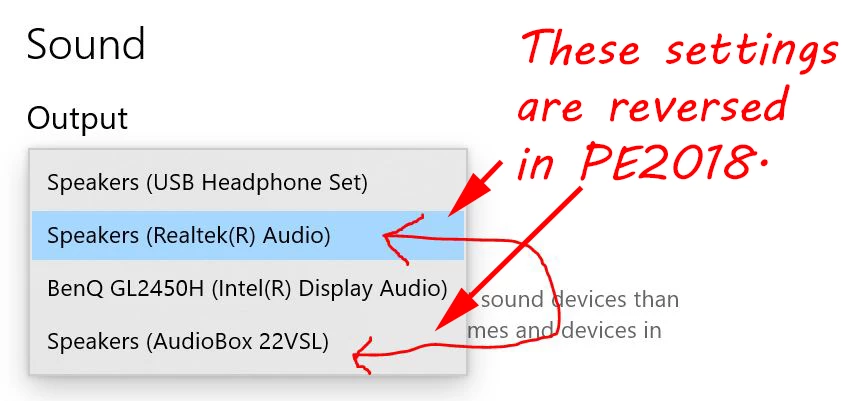
How can I fix this?
Thanks, everyone!
[text formatted by mod]
 AdChoices