


Participating Frequently
November 26, 2019
Answered

Premiere 15 crash after loadind the project

  • November 26, 2019
  • 9 replies
  • 447 views

I am working on a 1230 clips project with Premiere 15.0. I rendered a first video but when I open it know to make some modifications, Premier 15 crashes just after it is charged as soon I want to do anything. Sometimes, it won't charge being stuck on one clip. The CPU charge is about 30 %. Is there a recommanded maximum number of clips for a good working ? Something else ?

PC Asus N750JK - Intel i7-4700HQ x64CPU 2,4 GHz - 16 Go RAM -  Nvidia GeForce GTX 850M

Jean-Pierre

excuse my english, I'm french 😉
This topic has been closed for replies.
Correct answer Bill Sprague

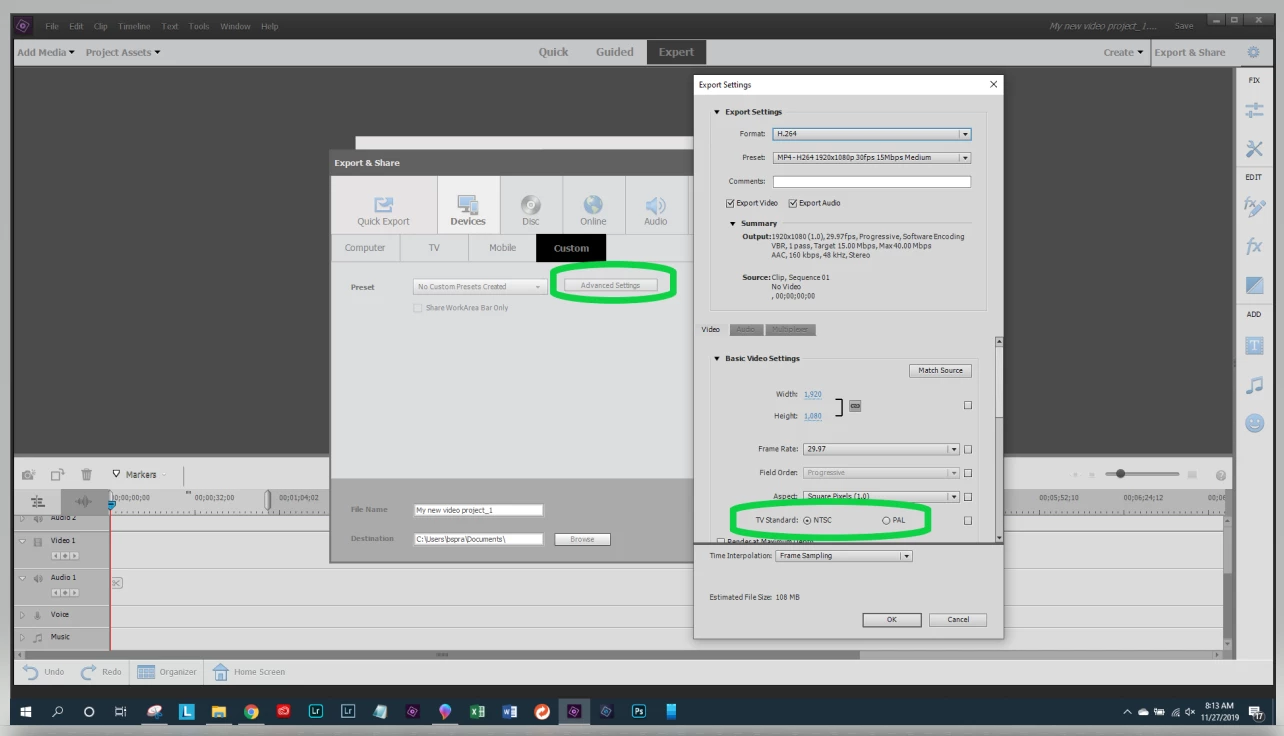
The usual way for correct project settings is automatic and it matches the first clip put to the time line.  If it is PAL from the camera it should be PAL in the project.   There is an option in the New Project dialog to manually select project settings and force it with a check box.   I've never tried editing with NTSC footage for PAL distribution.  Maybe you can try that.  

At output there is also a choice.  Look under the Advanced button.   .  Maybe you can try that.  

9 replies

Bill SpragueCommunity ExpertCorrect answer
Community Expert
November 27, 2019

The usual way for correct project settings is automatic and it matches the first clip put to the time line.  If it is PAL from the camera it should be PAL in the project.   There is an option in the New Project dialog to manually select project settings and force it with a check box.   I've never tried editing with NTSC footage for PAL distribution.  Maybe you can try that.  

At output there is also a choice.  Look under the Advanced button.   .  Maybe you can try that.  

JPSoAuthor
Participating Frequently
November 27, 2019

I uninstaled and re-installed PE 15, reassigned the working folders to a larger space disk (190 GB free) and...it's working ! BUT, I realise that the projects preconfiguration is NTFS 30 i/s although the location is France, the program is in french, and I had nothing to choose during the installation process (in Europe we use only PAL). How can I change that, without having to modify the settings for every new project ?

JPSoAuthor
Participating Frequently
November 27, 2019

There are 45 free GB after all the video and preview files charged. Isn't enough ?

Community Expert
November 27, 2019

You might stop the crashing if you reassign the scratch disks to drive with more space.  It will slow processing down but crashing may stop.  Scratch disks are controlled in the Preferences Menu.   

Peru Bob
Community Expert
Community Expert
November 26, 2019

"The program and working disk is a SSd 256 GB with 45 GB free."

That's not enough free space. You need a larger disk.

JPSoAuthor
Participating Frequently
November 26, 2019

The program and working disk is a SSd 256 GB with 45 GB free.

The video is writen on a SATA 465 GBwith 275 GB free.

Maybe the solution wouldbe to cut the project in two parts.

Peru Bob
Community Expert
Community Expert
November 26, 2019

" I have 275 GB left."
What kind of drive (HDD or SSD)  and what is its capacity?

Community Expert
November 26, 2019

Not sure what the issue is here, but a work around might be to separate the project into sections, output those sections to high quality intermediate video files and then finally combine the intermediate files to a final file.  

Community Expert
November 26, 2019

I don't know of, nor have heard of, a maximum number of clips.    How much spare disk space do you have?  It takes a lot!

JPSoAuthor
Participating Frequently
November 26, 2019

It is not a disk space problem, I have 275 GB left. I suspect a memory problem. When the project is charged, I noticed a memory charge of 98 %. The first rendered video is 17.7 GB.

JPSoAuthor
Participating Frequently
November 26, 2019

I forgot : Windows 10 - 1903

Jean-Pierre