


Premiere Elements 13 - 3 issues - no disk in drive, project does not show, can I turn a video image upright?
There was a previous question about Premiere Elements requesting answers about needing a disk to run, but the answers were not relevant to my OS.
I have Windows 10 Home Version 1067 OS 64-bit on 64x based processor -
My Adobe Premiere Elements was running enough to work with it to edit a video from my phone a couple of months ago. I cannot remember if the error message popped up or not, but I was able to work around it.
1) I now get the "Adobe Premiere Elements.exe - No Disk" error (red circle with x) "There is no disk in the drive. Please insert a disk into drive E:". This has 3 buttons, "cancel", "try again", or "Continue". If I click these buttons repeatedly, eventually this message goes away and it looks like I can use the program.
However, the program is not working! Last month, I created some videos on my phone, transferred them to my computer, edited them somewhat, and then saved them. When I ask it to load a .prel file, it does not. When I ask it to load the MP4 file, it does not. Up at the top, the file name is showing - I tried importing as new, opening as old, but I cannot see the visual file or work with it whether it is showing the file name there or not.
I have disks for Photoshop Elements 8 - and Premiere Elements 8. I still have them on my computer. I was able to open Premiere Elements 8. It also said there was an update for that 8.0.1. I can open the MP4 in that - and it is showing. If I have to use my earlier version, I will do that, but then why have I paid for the upgrade?
upgraded by downloading the Elements 13 programs - so I have no current disks.
I can open Photoshop Elements 13 and work in it without a problem. I did not get similar error messages on that.
I do not use a video editor often - just starting to - so I really did not need a fancy program. I probably open Premiere about 1 time a year - until recently.
I really don't want to invest in a NEW product or update if I can't even get direct support from the company on what I have. It took forever to figure out how to ask a question on site. The previous answers about this were over a year ago, so I was not confident I would get an answer.
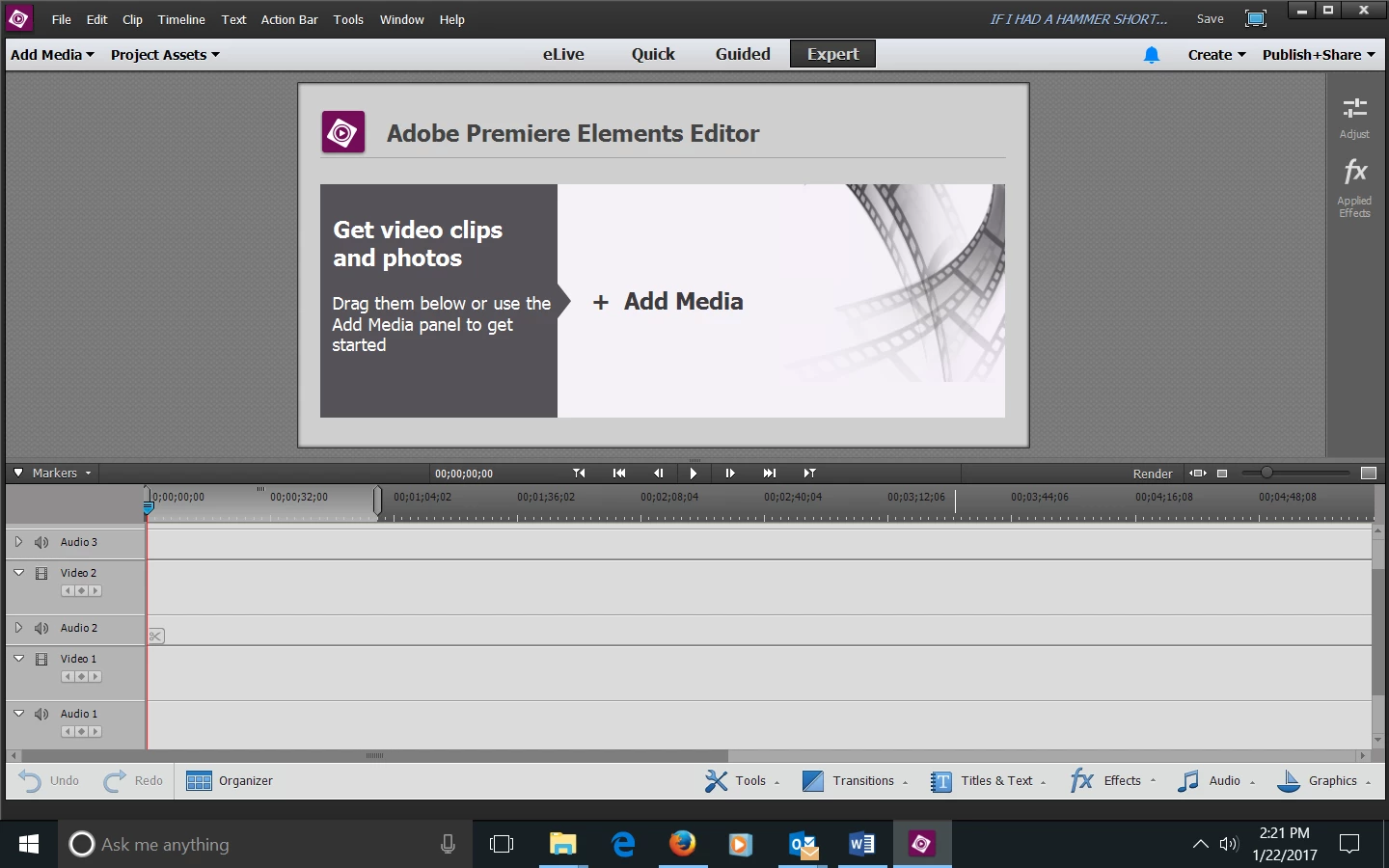
2) Screenshot below shows "If I Had A Hammer Short" is supposedly loaded, but there is no frame shot showing that I can work with or edit. It does not matter which file I tried, it did the same thing. I am able to play the video on my computer outside of elements. I created the original file and some others at the end of November.
I did the update/fix as prompted, but the program continued to prompt me to update/fix - after I did that. There is no change in how this program is working after that update.
3) When I open my video (when I was able to open) my video in both versions 13 & 8 - the image is turned sideways instead of up and down. There appears no way to rotate that image. I obviously want it to run upright instead of sideways. How do you do that?
 AdChoices