


Participant
April 18, 2021
Answered

Premiere Elements 14 - Serial number already used for the maximum number of allowed assets

  • April 18, 2021
  • 1 reply
  • 479 views

Hi there,

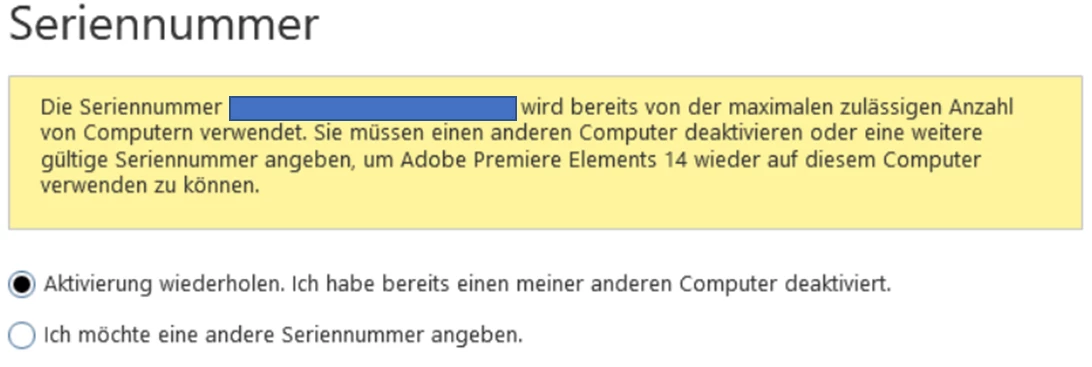
I installed Premiere Elements 14 on my new laptop and when I tried to start it, the message showed as you can see in the screenshot - too many licenses in use. I deinstalled Premiere on my old laptop, but still the same. Then I found out, that I have to deactivate / sign out and not (only) to deinstall the old Premiere. So I installed it again on my old laptop, chose there Help > Sign out.

But different than expected: Both laptops show this message now.

Can me help somebody here?

I didn't finde any other tips and am really helpless now 😕😕
 

This topic has been closed for replies.
Correct answer John T Smith

When you can't deactivate a serial number
BE SURE TO ONLY ASK FOR ACTIVATION SUPPORT TO ADJUST YOUR ACTIVATION COUNT
You may need to PERSIST or TRY AGAIN to find a support agent with more experience

Be sure to remain signed in with your Adobe ID before accessing the link
Do be aware that Adobe's staffing is impacted by the virus, so wait times are long
-make sure that your browser does NOT block ads, scripts, or pop-ups
-you must also allow 'cookies' in your web browser for the link to work
https://helpx.adobe.com/contact.html?rghtup=autoOpen
.
Also: beware of answering anyone who sends you a private message
-click for more information about scammers https://tinyurl.com/10791730

1 reply

John T Smith
Community Expert
John T SmithCommunity ExpertCorrect answer
Community Expert
April 18, 2021

When you can't deactivate a serial number
BE SURE TO ONLY ASK FOR ACTIVATION SUPPORT TO ADJUST YOUR ACTIVATION COUNT
You may need to PERSIST or TRY AGAIN to find a support agent with more experience

Be sure to remain signed in with your Adobe ID before accessing the link
Do be aware that Adobe's staffing is impacted by the virus, so wait times are long
-make sure that your browser does NOT block ads, scripts, or pop-ups
-you must also allow 'cookies' in your web browser for the link to work
https://helpx.adobe.com/contact.html?rghtup=autoOpen
.
Also: beware of answering anyone who sends you a private message
-click for more information about scammers https://tinyurl.com/10791730

Participant
April 18, 2021

Hi John,

great - the link worked after "accept all cookies", the support resolved the issue within 10 minutes.

Thank you for you detailed, helpful and quick answer. I will save your answer for later, in case I have any problems with a product of Adobe again...

Have a nice evening!

Greeting from Germany

John T Smith
Community Expert
Community Expert
April 18, 2021

If you will click the CORRECT ANSWER option my reply will show to anyone else who has the same problem
