


Premiere Elements 15 - Angle/Distance/Softness bug
Hi,
There is a bug in Premiere Elements 15 in text Color Properties under Angle, Distance, and Softness values. That is
Angle, Distance, and Softness do not retain set values, they go back to 1, 1, and 1 respectively.
Process:
Expert mode.
Menu 'Text' > 'New Text' > 'Default Text' resuts in "Add Text" field apears in viewport and "Title 0" in timeline.
Higlight "Add Text" and write the desired word, for example 'TITLETEST'.
Under 'Adjustments' > 'Text' > hit palette icon next to 'Color'.
"Color Properties" window opens.
Check 'Drop Shadow' checkbox.
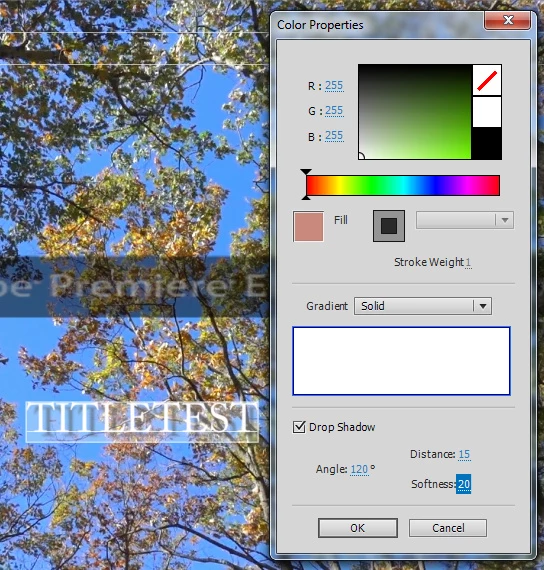
See "1 before.jpg'. Set 'Angle' value to 120, 'Distance' value to 15, 'Softness' value to 20, and hit 'OK' button.
"Color Properties" window closes.
Highlight 'TITLETEST', hit palette icon next to 'Color'.
"Color Properties" window opens.
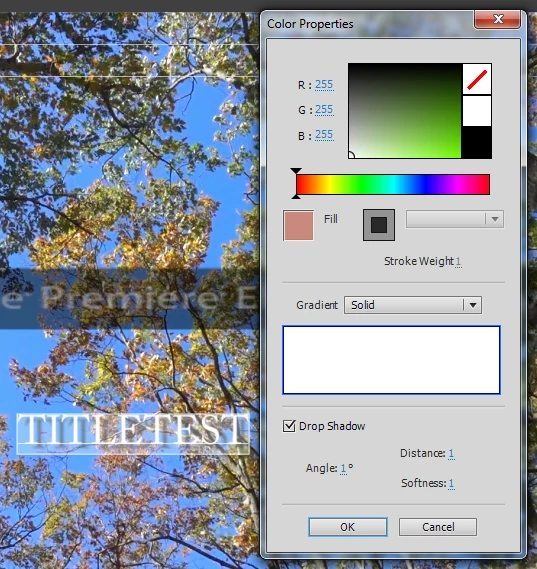
See "2 after.jpg". 'Angle', 'Distance', and 'Softness' values are 1, 1, and 1 ---> wrong values, it should be 120, 15, and 20!
When can I expect for this bug to be resolved and the update issued?
Attached are before and after jpgs.
 AdChoices