timbassador
Participant
February 19, 2018
Question

Premiere Elements 2018 Incompatible Display Driver

  • February 19, 2018
  • 1 reply
  • 1135 views

I am an absolute beginner to Premiere and after installing Elements 2018, I am receiving the dreaded "Incompatible Display Driver" message. A lot of advice suggests removing the BadDriver.txt file but there doesn't seem to be such a file with the new version of Elements. Have tried reinstalling drivers for my graphics card but doesnt improve the situation.

DirectXDiagnostic shows the following settings;
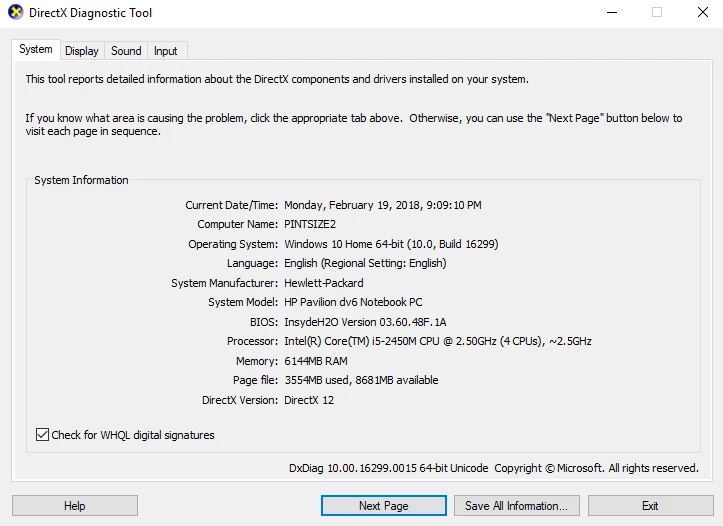
I must admit to having not used computers for much more than surfing the internet for the last decade so my knowledge is super limited and I have no idea what my next move is.

    This topic has been closed for replies.

    1 reply

    Participant
    March 21, 2018

    I've the same problem with Premiere Essentials 2018 with my NVIDIA GeForce GTX 750 and the "Incompatible Display Driver" message. I disabled the NVDIA Display driver, started Premiere Essentials 2018 again but without success.The "Incompatible Display Driver" message popped up again. I don't know what to do now. Photoshop essentials 10 runs fine!

    Community Expert
    March 21, 2018

    If it were me, I would start a "chat" at the Adobe help site.  They usually are good at installation issues. 

    Contact Customer Care

    Participating Frequently
    March 22, 2018

    Had the same issue but on Windows 7 - Managed to get Elements 2018 to load by going into taskmanager and deleting instances of GPUsniffer as they were being created just leaving one occurence running. Elements then ran but came up with this message. Detected generic Microsoft display driver. Please update  your display driver. Driver details: Microsoft Corporation - GDI Generic 1.1.0.

    Dismissed this message and Elements still running fine. Just seems a pity I'ved shelled out over £80.00 for something that seems to have a known glitch