


omiazad
Inspiring
June 28, 2020
Question

Premiere Elements 2020 do not save Scratch Disk Location

  • June 28, 2020
  • 2 replies
  • 574 views

Even in Premiere Elements 2019 this was working fine.


This is how it looks when we chage scratch disk location -
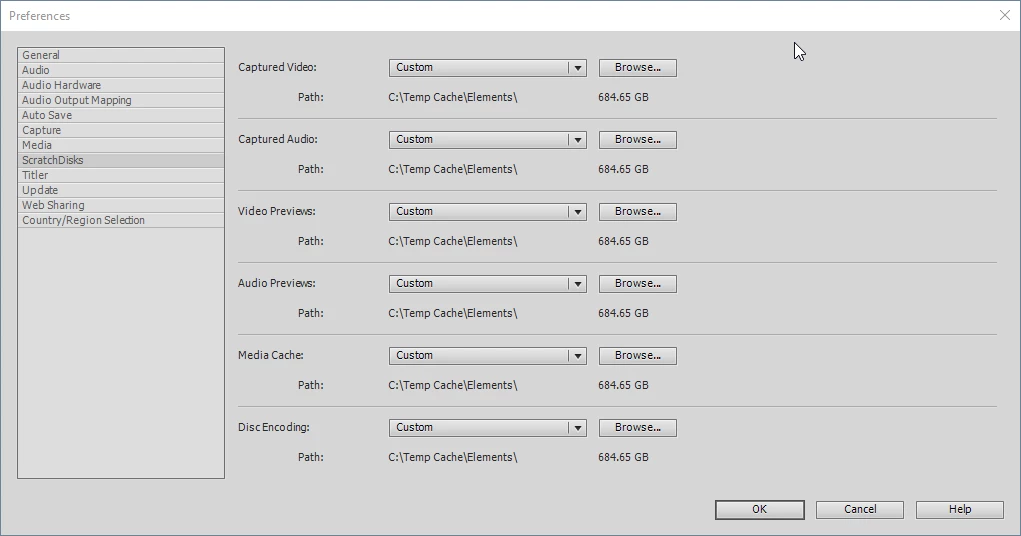
 

The scratch disk location do not stay where I save it in Premiere Elements 2020. I am paying Adobe since last 8 years and things are getting worse. Rendering takes more time, I do not find things I need. What the hell is going on!!

This topic has been closed for replies.

2 replies

Ann Bens
Community Expert
Community Expert
June 28, 2020

Set everything to Same as project.

omiazad
omiazadAuthor
Inspiring
June 29, 2020

If I wanted to put thing on the same folder, why there is this option avaiilable then? The whole point is to save the gabage files somewhere I want them to be. Right?


Here is a suggestion for you my friend, do not get involved in a converation you do not know the soluton  of. 

Ann Bens
Community Expert
Community Expert
June 29, 2020

This is an user to user forum.

The link WSprague supplied is for Premiere Elements.

Might want to read the healines again.

If you do not like the answers given to you which is entirely on a volontury basis maybe you should try and find the right answers somewhere else.

Community Expert
June 28, 2020

I'm not having those issues.  This forum is primarily made up of users.  There is not a direct input to Adobe marketing, development, engineering or any other staff here.  You can try this instead:  https://feedback.photoshop.com/photoshop_family/categories/photoshop_family_premiere_elements  

omiazad
omiazadAuthor
Inspiring
June 29, 2020

The issue is specific to 2020

The link you have provided is for photohp I guess.