
Participant
February 6, 2022
Answered

Premiere Elements 2020 video editor: enter export and share and it freezes

  • February 6, 2022
  • 2 replies
  • 403 views

Hi all,

I need help with the Premiere Elements 2020 video editor under Win10.

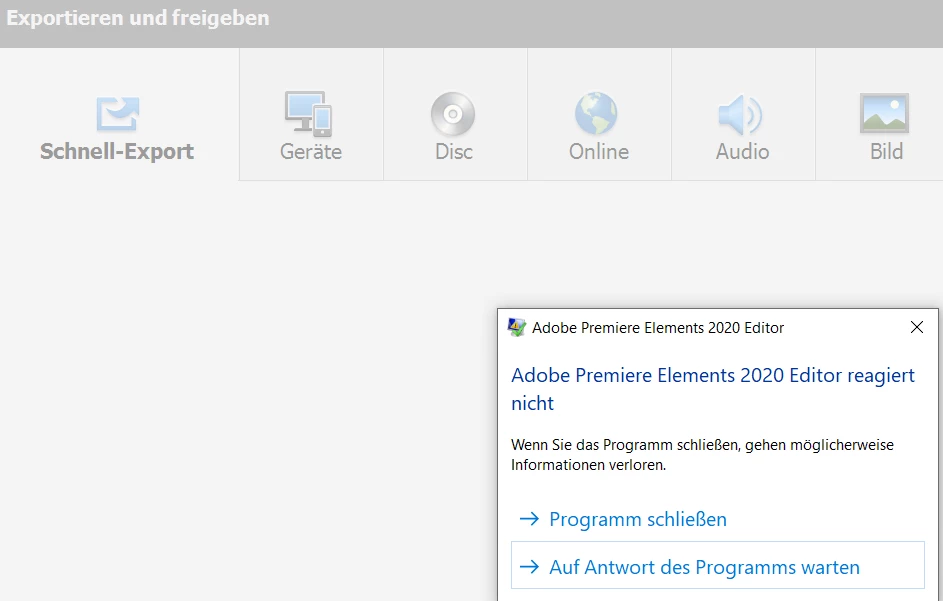
The problem is that selecting the export and share menu - the next screen freezes.

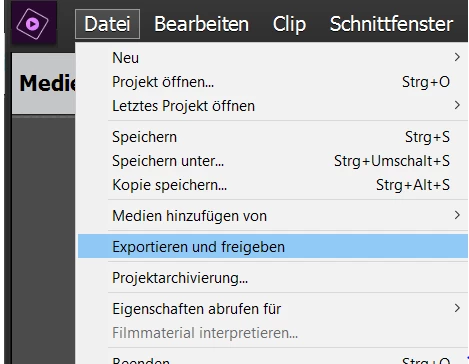
1) First select export and share (here screenshots in German)
 

2) getting an error on the new export and share screen.
Additional info:

Loading and working with videos are no problem in the Video Editor.

I tried different videos with different formats - all the same.

If I select the export and share menu without loading any video, this error appears too.


Environment: i9 / Win 10 Pro / 32 GB Ram / 500 GB free on HD

Today I ran an update on from Adobe, no change on thie behaviour.

Current Version on Premier Elements Video Editor is: 18.0 (20201207.daily.2234367)


Any hints for a solution or a place I can check (special logfiles etc.) would be great?


Best
  Roland

This topic has been closed for replies.
Correct answer Roland-DE

Perfect, yes. There is an option for switch off the GPU support. 

Thank you, now it's working.

2 replies

Community Expert
February 6, 2022

Does that version have the option of turning off the GPU in the General Settings page?  

Roland-DEAuthorCorrect answer
Participant
February 7, 2022

Perfect, yes. There is an option for switch off the GPU support. 

Thank you, now it's working.

Community Expert
February 7, 2022

Thank you for posting that you found my suggestion useful!  

Roland-DEAuthor
Participant
February 6, 2022

Just one addition note: 

On the first view the thread "Video editor 2020 freezes as soon as I click “Export and Share” seems to be the same, but I had a new video card: Radeon RX580 Series.

But to be sure I will update the graphic drivers.