
Participating Frequently
November 6, 2020
Answered

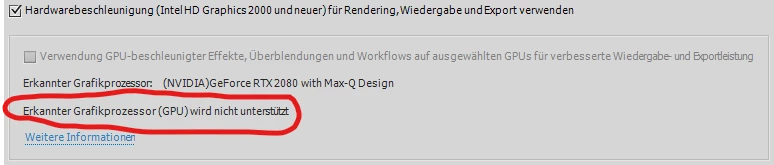
Premiere Elements 2021 GPU Support for NVIDIA GeForce RTX 2080 with Max-Q Design

  • November 6, 2020
  • 4 replies
  • 1477 views

Dear Adobe Team,

I see that you have now GPU Support for Premiere Elements.

I tested Premiere Elements 2021 but my NVIDIA GeForce RTX 2080 with Max-Q Design shows that this GPU is not supported.


I see that you support NVIDIA GeForce RTX 2060 so why not the RTX 2080?

Please can you add RTX 2080. 


If this is working i will upgrade immediately from 2020.


Thanks in advance

Stefan
This topic has been closed for replies.
Correct answer HOTELECHOMIKE

It is disabled with the trial.

4 replies

HOTELECHOMIKE
HOTELECHOMIKECorrect answer
Inspiring
November 10, 2020

It is disabled with the trial.

Participating Frequently
November 10, 2020

Cool Thanks i bought it now and i have a checked GPU

Greg_S.
Community Expert
Community Expert
November 9, 2020

@stefanw41524332 said:

Hi, i have also a desktop PC with a GTX 960.  It says the Card is Supported but i cannot activate it?!?


Does your desktop meet ALL of the system requirements including CPU and Windows build?

Participating Frequently
November 9, 2020

Hi yes looks good.


CPU - Intel(R) Core(TM) i7-6700 CPU @ 3.40GHz

System - Windows 10 Pro V 10.0.18362

RAM - 32GB

Free Space - OK

Community Expert
November 6, 2020

You can go here and sign up for a beta program.  I have and have not heard back but, it is a chance!  (Scroll down to near the bottom.)


https://helpx.adobe.com/premiere-elements/using/gpu-acceleration.html#unsupported_cards

Participating Frequently
November 7, 2020

Thanks perfect!!!

Legend
November 6, 2020

Thanks for the information. However, this is a user to user help forum. It's not the best way to reach Adobe.