



Question
Premiere Elements 2022 adds damaged frames
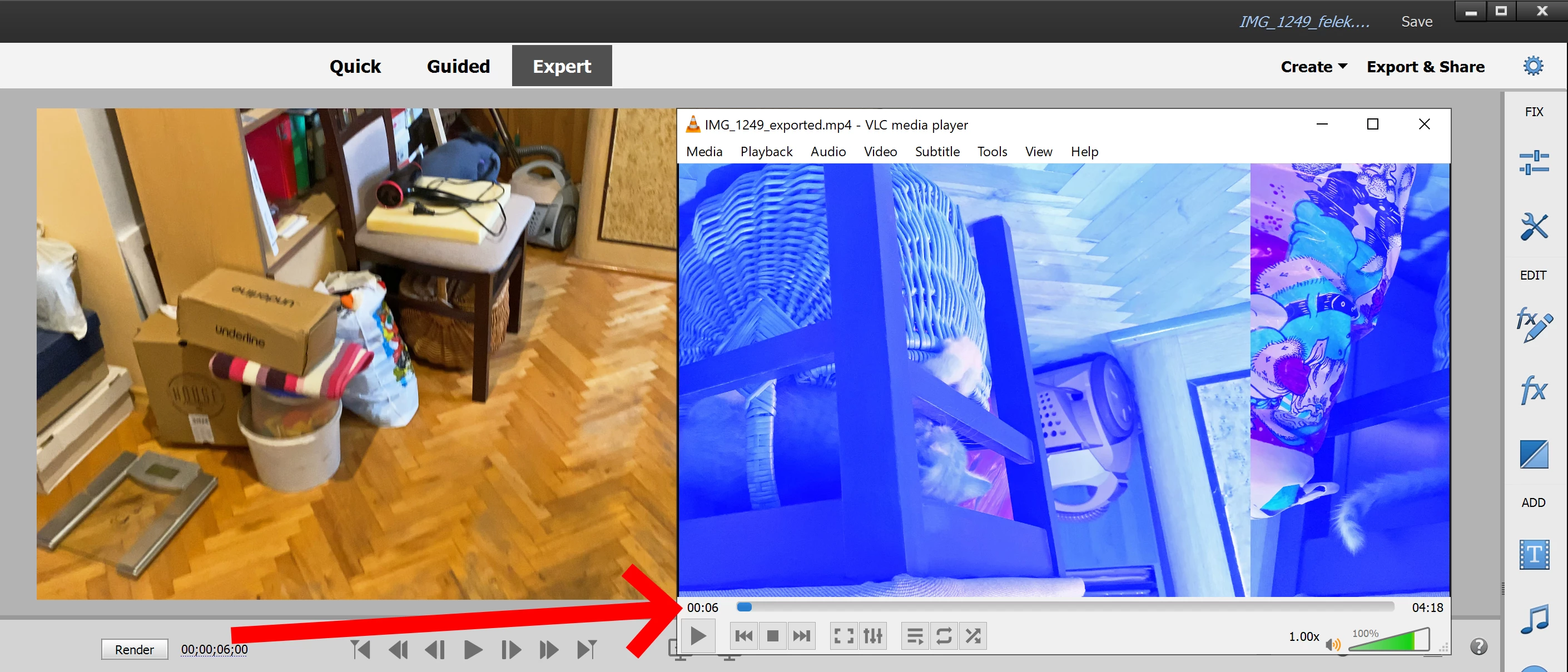
Sometimes in the exported file, Premiere Elements 2022 adds damaged frames at the beginning of the new clip in the timeline. This doesn't happen in the preview, only in the exported file.
Damaged frames also don't exist in the original clip.
See sample screenshot showing exact same frame in PRE and external player.
I was so happy to buy this software but it doesn't seem to work for me.
I've followed https://helpx.adobe.com/premiere-elements/kb/gpu-troubleshoot.html but it doesn't help. I have disabled GPU Acceleration in Edit - Preferences but it doesn't help.
I have latest NVIDIA drivers 496.76 for GTX 1070, latest Windows 10 updates.
Intel(R) Core(TM) i5-7400 CPU @ 3.00GHz 3.00 GHz
64.0 GB
Windows 10 Pro 21H2


 AdChoices