



azadrumana
Inspiring
October 25, 2021
Question

Premiere Elements 2022 Cannot Restore Keyboard Customisation

  • October 25, 2021
  • 1 reply
  • 180 views

I customise my keyboard to make my workflow easy. I believe everyone else does the same. 


I use the key Q to split a clip in my timeline.
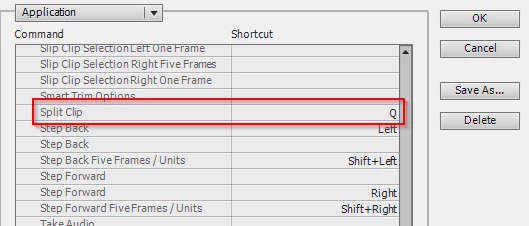
 

Now when I close PE and open it cannot restore that Q key's function. I have to navigate Edit - Keyboard... and close that window to restore the function.


Not only the split function restore, some functions do not even work. I have found Delete and Close Gap function in more than one place, when I assign a key, it works in certain places and then it do not. 


Strange, right!! 

This topic has been closed for replies.

1 reply

Peru Bob
Community Expert
Community Expert
October 25, 2021
quote

I have found Delete and Close Gap function in more than one place, when I assign a key, it works in certain places and then it do not. 


By @azadrumana


If there is a clip in a track below the track where you want to delete and close the gap, including audio, it will not work.

azadrumana
Inspiring
October 26, 2021

If there is a clip in a track below the track where you want to delete and close the gap, including audio, it will not work.


By @Peru Bob

I know how that woks my friend. In this version it went little tricky. So user have to find the right one to use. The painful part is the split one.