


Participant
April 2, 2018
Question

Premiere elements hangs all the time (MAC OSX)

  • April 2, 2018
  • 5 replies
  • 1557 views

Hi all,

I just bought elements premiere 2018 (version 16.0) two weeks ago.

It is installed of both my iMac and my Macbook pro) and both give me the same problem. All software /OS is up-to-date !

Movie editing is OK most of the time !!  although once in a while it just hangs for some reason. (So I save a lot while processing).

Now I started with adding (motion) titles into my movie and this really drives me crazy. It is absolutely not workable anymore. Hangs every few minutes and all I can do is kill the process and start over again.

Any clues???

Thanks

Charles

The Netherlands
This topic has been closed for replies.

5 replies

williebegoode
Participating Frequently
September 21, 2018

FCBCharly, I have the same version of PRE on my MacBook Pro with the same OS as yours. The problem with animated text is that while it works fine once added to a video, adding animated text and text in general to PRE, whether you have a Mac or Windows (...or a Jupiter Ace...), is awkward to work with. (Working with still text isn't much easier.) What I've found to work best is to: 1) plan ahead, 2) get all of your videos and other assets in the Project Assets window before putting them on the Timeline, 3) Frequently save and render, and 4) do one step at a time. Added features like Pan/Zoom will work fine as well, but you need to add those features while not jumping back and forth with other additions and changes. Well planned works best with PRE and MacBook Pro.

williebegoode
Participating Frequently
May 14, 2018

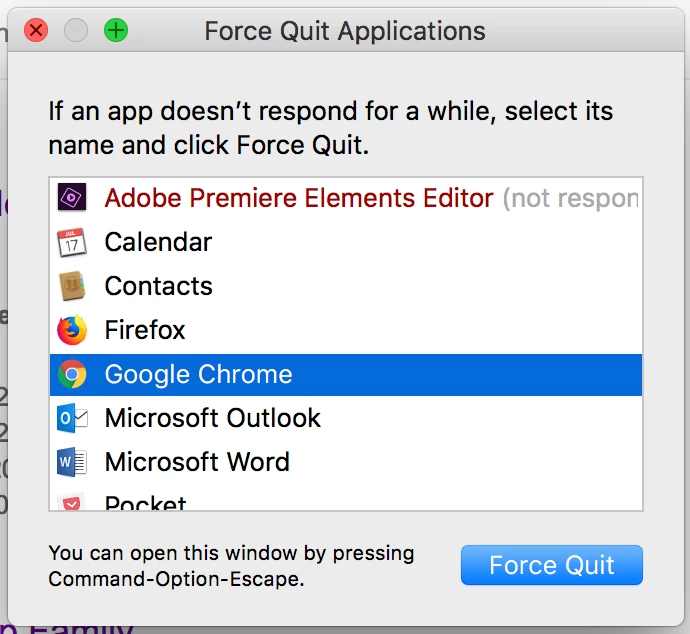
Just looking at the Force Close window, you can see that a lot of other big programs are open, and the first place to start, is to close everything but Prenier Elements. (I have a MacBook Pro.) Both Outlook and Word can gobble up memory. Google Chrome can also be very busy all the time while it's open. So, close everything; re-start, your MacBook and just open PRE, and if you need some of those other programs, open just as needed.

deano411
Participant
May 13, 2018

Having the same issue here on my brand new MacBook Pro with Premiere Elements 16
Been a long time user of Elements and currently editing a video and finding the software un-workable with crashing every 10 mins... especially if I try to preview a video or apply video effects (pan/zoom).

All softwares up to date, have you managed to find a fix other than setting auto-save to every 5 mins?

Cheers,

Dean

grantw14810771
Participant
September 21, 2018

Exact same issue for me. Any time I try to add an effect (e.g. pan/zoom) the application freezes and I need to do a force quit. Seriously frustrating!

Participating Frequently
April 5, 2018

I have 10.13.4 on a MacBook pro  and I have the 2018 Elements Bundle.  Premiere continually crashes at the worst times. I have it set to save every 5 minutes (after a lot of duress). Still doesn't help. I have to force quit all the time. Just tonight spent an hour, had to force quit and lost everything I had done. Elements Organizer is useless other than importing . The files for the most part, never connect. I am a long time Elements user. This version of both these features is extremely disappointing.

Community Expert
April 5, 2018

As a counterpoint, on a Windows 10 machine, Premiere Elements 2018 is doing very well.   Without understanding of Apple systems I would suggest asking for a refund. 

Peru Bob
Community Expert
Community Expert
April 2, 2018

What are the computer specifications?

What size and how full is your hard drive?

Legend
April 2, 2018

Also, are you sure you're using OSX and not Mac OS?

Which version of Mac OS are you using?

FCBCharlyAuthor
Participant
April 4, 2018

Sorry Steve,

I am still in the 'Unix' mode. Think that everything that has a base in UNIX, needs an X in the OS name

Nevertheless, you are right, Mac OS (see the specs of my system in the other message

thanks!