
Participating Frequently
September 17, 2022
Question

Problem editing GoPro Videos

  • September 17, 2022
  • 3 replies
  • 531 views

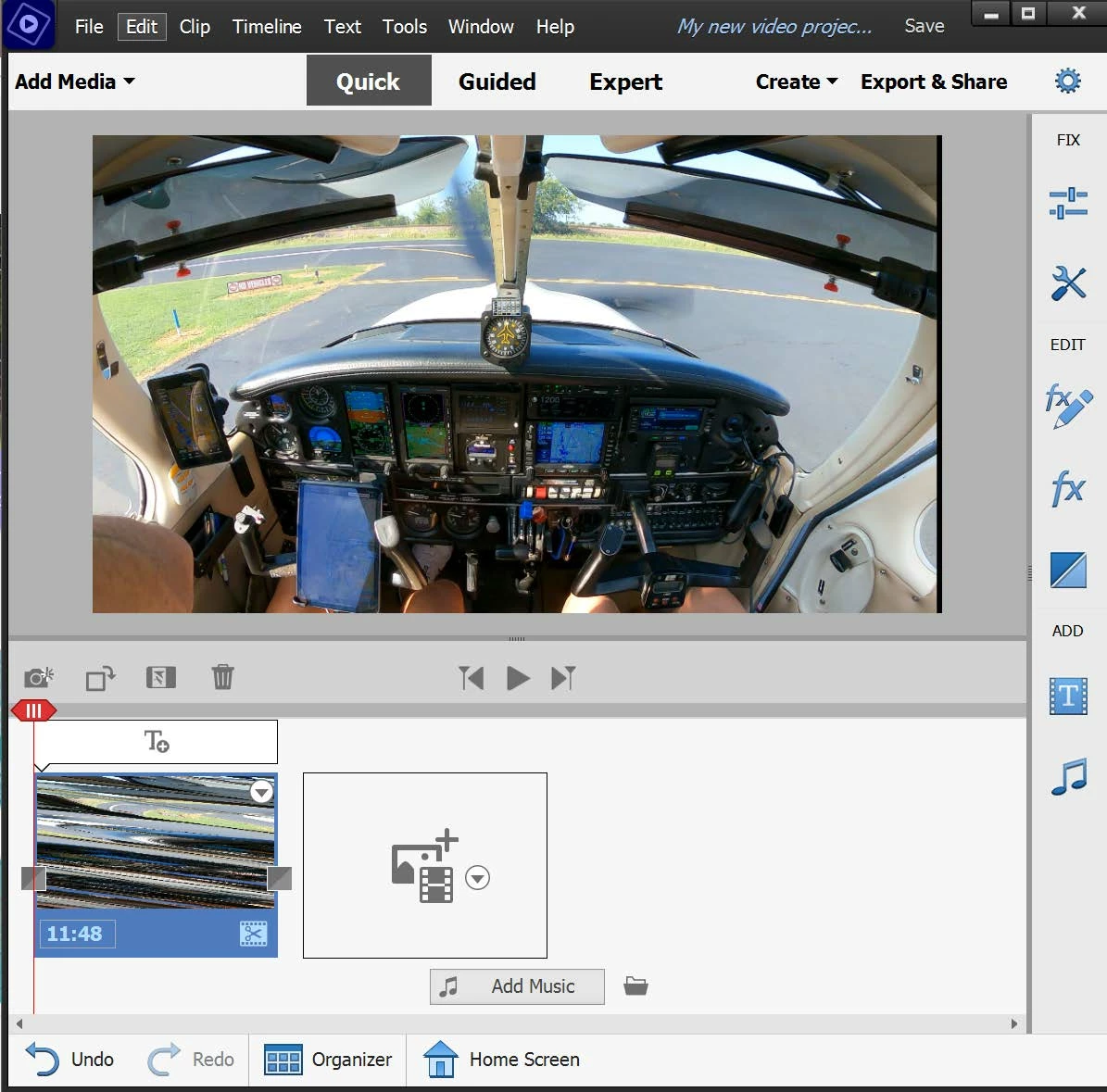
Anyone know why the thumbnail below the main screen is diagonal bars? Reminds me of old analog TV screens that were out of adjustment. The video plays OK but the editing strip down below is unusable.


Windows 11

Premier Elements 2022

GoPro 9 with Wide Angle

2704x1520   29.97 fps
 

This topic has been closed for replies.

3 replies

Peru Bob
Community Expert
Community Expert
September 17, 2022

Frame rate : 46.875 FPS (1024 SPF)


That is your issue.


Participating Frequently
September 18, 2022

Hi Bob,  Both videos display "Frame rate: 46.875 FPS (1024 SPF)."  One video has the problem, the other doesn't. How is this the issue?

Peru Bob
Community Expert
Community Expert
September 18, 2022
quote

How is this the issue?


By @Crooked Island Guy


Many users are having issues with VFR. Try transcoding and see if that fixes it.


Handbrake to convert to constant frame rate:
https://handbrake.fr/downloads.php
Here is a tutorial:
https://www.youtube.com/watch?time_continue=34&v=xlvxgVREX-Y

Shutter Encoder may also be used to convert to Constant Frame Rate:
https://www.shutterencoder.com/en/

John T Smith
Community Expert
Community Expert
September 17, 2022

>Format : HEVC


I have read of other problems with HEVC (I don't have that type of video, but I think the solution was to buy/install an addin... maybe from Microsoft?)

Participating Frequently
September 17, 2022

Yeah, I've read that too. I was going to purchase the HEVC addin for Windows ($0.99) but since the Windows player and the Adobe Premier play the higher frame rate with no problem, I concluded it wasn't the problem. I may try it anyway now that there's no other clear solution. For now I'll just stick with 60 fps.

John T Smith
Community Expert
Community Expert
September 17, 2022

Do not count on Windows to be fully up to date when it comes to device drivers
Go to the vendor site to be sure you have an updated driver for your graphic adapter
nVidia Driver Downloads https://www.nvidia.com/Download/index.aspx?lang=en-us
-for all Adobe programs use the STUDIO driver, not the GAMING driver
-To achieve the highest level of reliability, Studio Drivers undergo extensive
-testing against multi-app creator workflows and multiple revisions of the top
-creative applications from Adobe to Autodesk and beyond
If you have a laptop you MAY also need to check for a laptop specific nVidia driver
-SOME laptops require an approved driver from the laptop company, not nVidia
AMD/ATI Driver https://www.amd.com/en/support
Intel https://downloadcenter.intel.com/product/211969/Intel-HD-Graphics-Family
There are also intermittent reports that the newest driver is not always the best driver due to driver bugs or compatibility issues, so you MAY need to try an earlier driver version

Participating Frequently
September 17, 2022

Thanks for the suggestion, John. I updated my nVidia driver to the latest Studio version. It didn't help. One thing I should mention is I am only having trouble with yesterday's GoPro videos. I went and looked at other GoPro videos I took last month and they do not exhibit the same problem. Previous videos were filmed at 60 fps. Yesterdays were done at 30 fps. Otherwise, all other settings were the same. Makes no sense.


It's odd that Windows and GoPro Quick can play the raw videos just fine. I'll have to do more experimenting to see if it's the camera or something else.  Thanks again.

John T Smith
Community Expert
Community Expert
September 17, 2022

As well as FPS being different, what else is different?

Free program to get file information for PC/Mac http://mediaarea.net/en/MediaInfo/Download
- a MediaInfo tutorial https://youtu.be/Ivy9ckSX1M0
- when you analyze your file in MediaInfo and post a screen shot in the forum, do so in TREE view
- post your information IN your message, not as an attachment that someone would have to download