


Participant
December 6, 2017
Question

Project defaults to 32bit audio, 16 bit audio added to the timeline sounds horrible

  • December 6, 2017
  • 4 replies
  • 1666 views

I started a new project and selected DSLR 1080I FHD, as well trying other similar project presets. When I import files into PE2018, everything seems to go fine. If I drop the imported video and audio files into the timeline, I can scrub, but the audio is about half speed and has horrible digital noise.

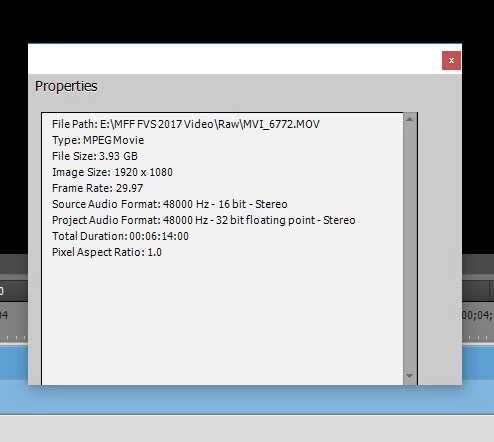
Upon looking at the properties for the clip, It is 48KHz PCM 16bit stereo

The project is set to 48KHz PCM 32 bit floating point stereo

I suspect that this is the problem, but I can find no place to change the project audio away from this 32bit float setting.

Captured movies are MOV format all I frame 1080 29.97 from a Canon 80D camera

Audio track is 48KHz 16bit PCM stereo WAV
    This topic has been closed for replies.

    4 replies

    Community Expert
    May 13, 2020

    This is a two year old topic.  There is no way of knowing if the original question was answered.  Please consider starting a new topic with a screen shot of the "tree" view from the (free) MediaInfo program.  Good luck!

    cst96
    Known Participant
    May 13, 2020

    Same problem...solved?

    Ann Bens
    Community Expert
    Community Expert
    December 6, 2017

    Upon looking at the properties for the clip, It is 48KHz PCM 16bit stereo

    The project is set to 48KHz PCM 32 bit floating point stereo

    This is correct, nothing wrong with those settings.

    Might want to check the hardware settings in the Preferences.

    Legend
    December 6, 2017

    Open a sample of your video in the free download MediaInfo. In MediaInfo, set View to Text and copy and paste the report it generates to this forum.

    Once we know your video's complete specs, we'll be better able to recommend a solution.

    This does not appear to be camcorder video, so it may need to be converted to a more editable format.