


BaroneHK
Participant
November 15, 2018
Answered

Project is not compatible with current version - even so it was saved an hour ago

  • November 15, 2018
  • 2 replies
  • 457 views

I am using a iMac with OS X 10.14.1 (18B75) (= Mojave).

Even so I do not know whether that is part of the problem, I will try to describe it here.

Since a while I experience situations, that I save a project with Adobe Premiere Elements 14 and an hour later I cannot open it anymore.

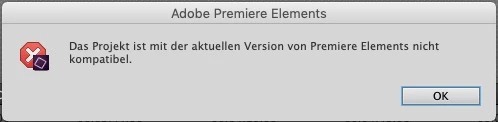
The software tells me: "This project is not compatible with the current version of Premiere Elements". Even the autosaved project file would refuse to work for me with the same (damned) message.

Sometimes it would help, that I opened a backed up project file (several month old) to work on the project again.

Any hints or help from anybody??

Message screen (in German):
This topic has been closed for replies.
Correct answer BaroneHK

It could be a Mojave issue.


I guess you (Peru Bob) are right with your statement: it may be a MOJAVE- and/or AFPS-problem. My system did not get converted to AFPS with High-Sierra, but with Mojave.

Findings: I figured out, that the problem does NOT affect all my project files.

It shows up as open, save and try to reopen large project files (approx. 1:15h). As I go thru the test with small projects, the problem das not appear.

I do not know, how to handle my next vacation video !?!?

By the way, Bob: I completely reinstalled PE-14 (no solution) and I installed the new version (PE-2019) and experienced the same problem.

Thanks to anyone !!

2 replies

Peru Bob
Community Expert
Community Expert
November 15, 2018

You may want to try reinstalling Premiere Elements.

BaroneHK
BaroneHKAuthor
Participant
November 15, 2018

Thanks,

I already reinstalled the software. I even installed the Trial-Version of Premiere Elements 2019 and got the some message.

Please note: when I went back to a fairly older backup of the PRE-file > that works for me.

Then I safe it and cannot reopen the project. Strange ...

Peru Bob
Community Expert
Community Expert
November 15, 2018

It could be a Mojave issue.

Community Expert
November 15, 2018

The only time I've seen posts here with that issue is when the project started with another version.  Did the project start with any other version?

BaroneHK
BaroneHKAuthor
Participant
November 15, 2018

No, the project was edited with that version of Adobe Premiere Elements.

As I mentioned in my post: I just closed the project an hour before and try to reopen it.

Best regards and thanks,

Harald