Participant
December 7, 2018
Answered

Randomization of imported media in Premier Elements?

  • December 7, 2018
  • 2 replies
  • 438 views

I have JPEGs from Lightroom which are ordered numerically.  When I highlight those to bring into PE as new assets, they are randomized.  This seems to be a new problem as I have not experienced this while generating videos of still images in the past.  Any ideas...?

Bob

This topic has been closed for replies.
Correct answer HOTELECHOMIKE

You can sort your project assets in a limited way - should work for you since you have ordered them numerically.

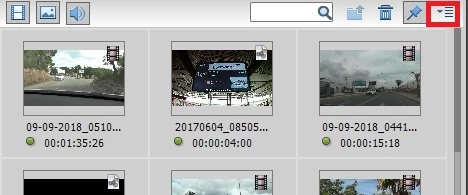
Under Project Assets click on the Panel options button in the top right-hand corner:

This produces a pull down - one of the options is Sort by & you can choose Filename (which sounds to be what you need) or Duration.

2 replies

HOTELECHOMIKE
HOTELECHOMIKECorrect answer
Inspiring
December 7, 2018

You can sort your project assets in a limited way - should work for you since you have ordered them numerically.

Under Project Assets click on the Panel options button in the top right-hand corner:

This produces a pull down - one of the options is Sort by & you can choose Filename (which sounds to be what you need) or Duration.

Participant
December 8, 2018

Many thanks, worked a dream.

Bob

HOTELECHOMIKE
Inspiring
December 8, 2018

Bob - please mark my answer from yesterday as being correct.

HEM

nidhibhushan_23
Adobe Employee
Adobe Employee
December 7, 2018

Hello Bob,

If I understand correctly, you imported few JPEGs inside Premiere elements and when you look inside Project Assets, the media appear randomised. This is known behaviour and it is expected that user is going to arrange the media himself as per his choice on timeline. He can drop any media file on timeline and later drag and drop to arrange. Hope this answers your question.

Thanks,

Nidhi Bhushan.