omiazad
Inspiring
September 30, 2019
Answered

Remove Effects from Multiple clips

  • September 30, 2019
  • 2 replies
  • 771 views

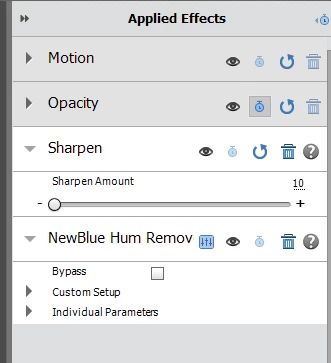
Take a look at this:


As you can see, I have selected one clip and there are 2 effects applied to it. I have multiple clips in my timeline, which have multiple effects like these. Can anyone suggest how I can remove them all together? 

This topic has been closed for replies.
Correct answer Steve Grisetti

Well, you could right-click on the clip on your timeline and, under the Clip sub-menu, select Remove Effects/All Effects.

This should work even if you have multiple clips selected on the timeline.

2 replies

September 30, 2019

right-click on the clip on your timeline and select Remove Effects/All Effects.

Steve GrisettiCorrect answer
Legend
September 30, 2019

Well, you could right-click on the clip on your timeline and, under the Clip sub-menu, select Remove Effects/All Effects.

This should work even if you have multiple clips selected on the timeline.

omiazad
omiazadAuthor
Inspiring
September 30, 2019
Many thanks. Not sure how I missed that.