


Participant
May 23, 2021
Answered

Removing or replacing word (spoken text)

  • May 23, 2021
  • 1 reply
  • 2214 views

I'm using Adobe Element Premiere Elements 13, have a video (MP4) of which video is fine but there are at 2 different spots 1 word I want to mute or replace with a beep. Can I do that with this application and if so, how?

 

This topic has been closed for replies.
Correct answer Ann Bens

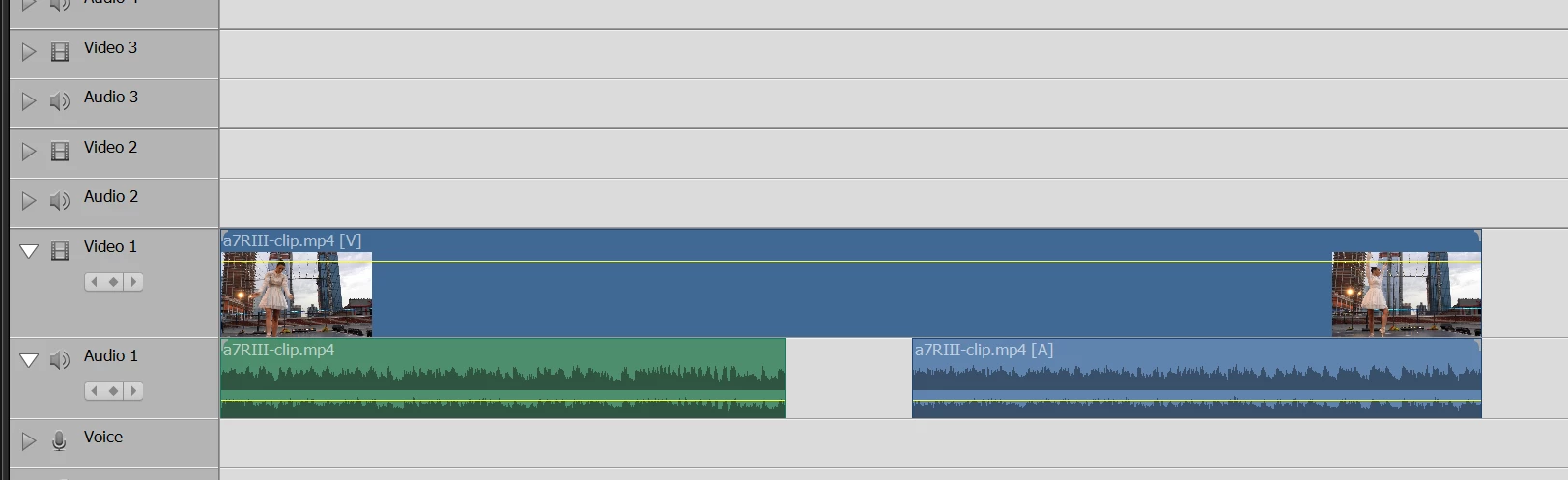
Hold down Alt and select audio

Hit scissors : will cut just the audio

Move playhead and cut again.

Select small audio clip and delete.

Video will be untouched.

Will look something like this:

1 reply

Community Expert
May 23, 2021

Yes you can it is not hard.  


You can cut the clip where you want the sound, unlink the audio from the video and replace the audio part with whatever sound you want.


There several other ways that may work for you too.  Another is to but the sound on a track above the primary and use keyframes to lower the volume in the primary track.

Participant
May 23, 2021

Thanks for the fast response and good tips, I'm going to try them later today!