
Participant
December 22, 2022
Question

Ressources du projet

  • December 22, 2022
  • 2 replies
  • 333 views

Bonjour.

Je viens de passer de Premiere Elements 2018 à Premiere Elements 2023 et je me trouve avec quelques problèmes. 

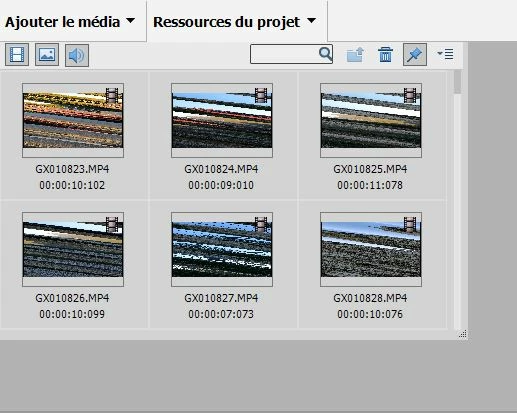
Dans les "Ressources du projet " les médias sont rayés et donc impossibles à utiliser !

Ce sont les médias issus de la GoPro 9, filmés en 2,7K.

Pour info:

Windows 10 Famille version 22H2

Processeur 11th Gen Intel(R) Core(TM) i5-11400F @ 2.60GHz 2.59 GHz

Ram 32,0 Go (31,8 Go utilisable)

Carte graphique Nvidia GeForce GTX 1650

Merci de votre aide
 

This topic has been closed for replies.

2 replies

John T Smith
Community Expert
Community Expert
December 22, 2022

>These are the media from the GoPro 9, filmed in 2.7K


https://handbrake.fr/ open source transcoder/converter to create a new file to see if that file will work

Participant
December 24, 2022

Bonjour,

J'ai essayé 1080, 2.5K et 4K et oui cela fonctionne. 

Est ce que à l'avenir je dois encoder toutes mes séquences ou je peux modifier un paramètre dans Premiere Element ou la GoPro ?

Merci de votre réponse.

John T Smith
Community Expert
Community Expert
December 24, 2022

I don't use that camera, so you will need to look in the user manual to change a camera setting

John T Smith
Community Expert
Community Expert
December 22, 2022

Do not count on Windows to be fully up to date when it comes to device drivers
Go to the vendor site to be sure you have an updated driver for your graphic adapter


nVidia Driver Downloads https://www.nvidia.com/Download/index.aspx?lang=en-us-for
all Adobe programs use the STUDIO driver, not the GAMING driver-To
achieve the highest level of reliability, Studio Drivers undergo extensive-testing
against multi-app creator workflows and multiple revisions of the top-creative
applications from Adobe to Autodesk and beyond


If you have a laptop you MAY also need to check for a laptop specific nVidia driver-SOME laptops require an approved driver from the laptop company, not nVidia


AMD/ATI Driver https://www.amd.com/en/support


Intel https://downloadcenter.intel.com/product/211969/Intel-HD-Graphics-Family

Participant
December 22, 2022

Merci de votre réponse.

J'ai fait la mise à jour de tous les pilotes mais cela n'a rien changé...

Une idée de quoi cela peut venir ?