


Participating Frequently
December 28, 2019
Answered

saving a video for online sharing

  • December 28, 2019
  • 5 replies
  • 1113 views

I've used Adobe Premiere Elements 2018 for quite some time now but just got the 2020 version. I edited a video and saved it the same way I always have except this time I was unable to upload it to YouTube. I went into the location where I save all my videos and this particular one's "type" is set as "Adobe Premiere Elements Project" where as all my other videos from the 2018 model save as "MP4 File" and can upload to YouTube. Am I saving my new video incorrectly?

This topic has been closed for replies.
Correct answer Ann Bens

5 replies

Ann Bens
Community Expert
Ann BensCommunity ExpertCorrect answer
Community Expert
December 30, 2019

Community Expert
December 29, 2019

Another choice is to start an online "chat" support session with Adobe staff.  They can remotely run your computer and tell you what is happening.  Pick "Online Support" in the Help menu to do this. 

Community Expert
December 29, 2019

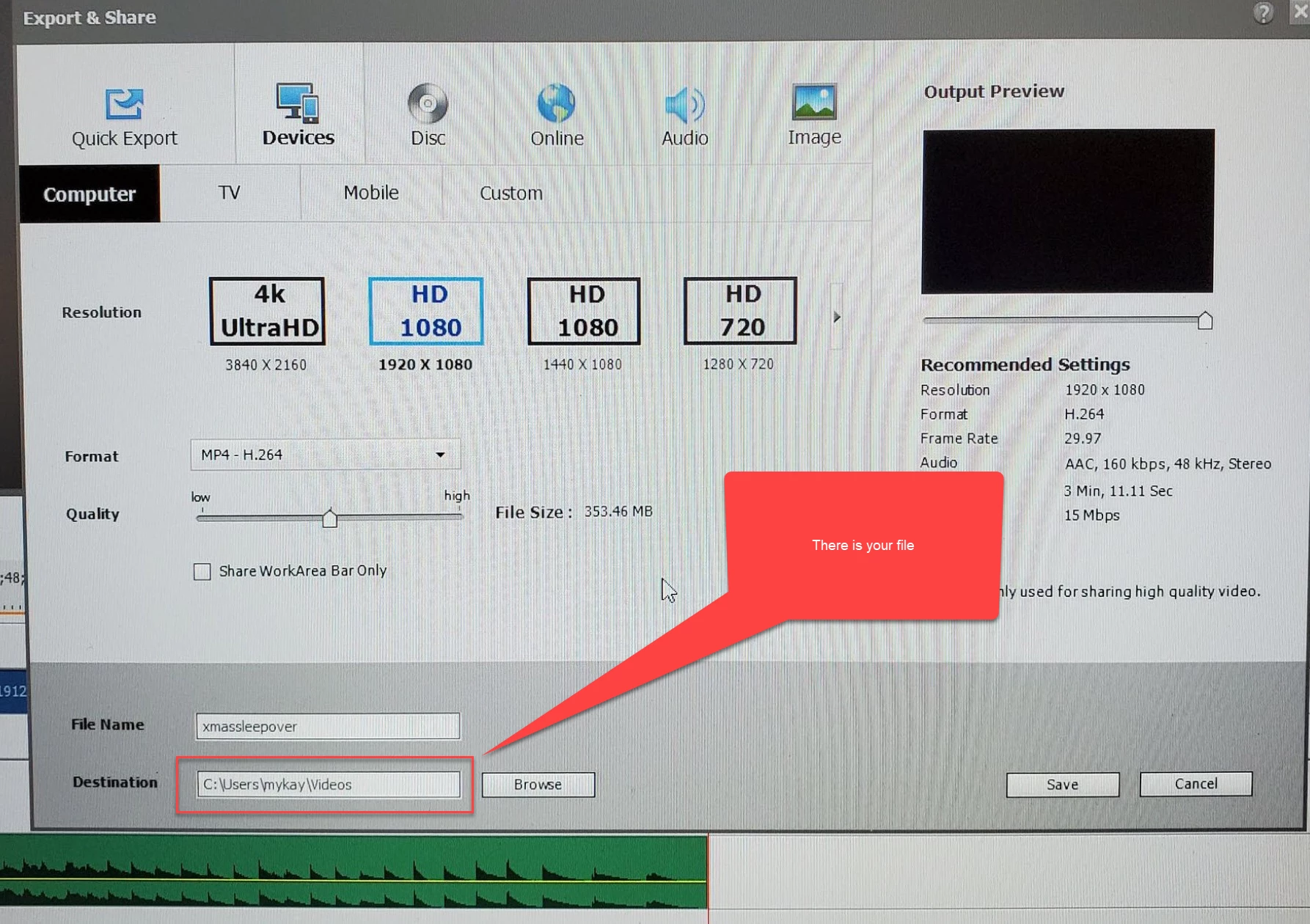
Would you please reply with a screen shot like this one?  

Participating Frequently
December 30, 2019

Community Expert
December 28, 2019

Premiere Elements does save projects.  The file extension is .prel.  To output a finished file the "Export and Share" procedures are used.  Tyically the created video files have the extension of .mp4 and are compatible with YouTube.   If you are not getting .mp4 files, it might be necessary to walk through what you are actually doing.  

Participating Frequently
December 29, 2019
I go to "Export and Share" in the top right corner, select "Devices" and
choose HD 1080 (1920 X 1080) in the Computer section then click *save. *It's
the same process I've always done but it's now saved as a different file
type in my computer 🤔 🤔
DelphiZoa
Participating Frequently
December 28, 2019

Hi Mykaylap,


I'm going to preface this by saying that I don't use Adobe Premiere Elements regularly (I'm more of a Premiere Pro person). However, it sounds like Elements is defaulting to the Adobe Premiere Elements Project file format for saved files. To get an MP4 or other share-compatible format, you may have to change the way you export files. This help document runs you through export options in Elements 2020.


Let us know if that helps or if you are still experiencing issues.

Participating Frequently
December 29, 2019
thank u so much!