
Screen Aspect Ratio in Premiere Elements 10
I was editing a video in Adobe Premiere Elements 10. At some point, the aspect ratio of the preview screen in Premiere changed from 16:9 to 4:3. This causes the video to be surrounded with black bars. I Right clicked on the video in the Project pane and I chose 'Interpreting Footage'. It allows me to change Pixel Aspect Ratio of a clip there but it only stretches my video. Saving in 16:9 aspect ratio only cut the corners of my video and saved as 4:3. When I start editing a new project from the begining, it seams to keep the screen aspect ratio correctly at 16:9.
How do I change the aspect ratio of the Premiere's screen so my 16:9 video is not inside 4:3 screen? In other words, how do I tell Premiere that the video I work with is 16:9 not 4:3. I need the 16:9 video to be in 16:9 screen in Premiere. Take a look at the photo examples: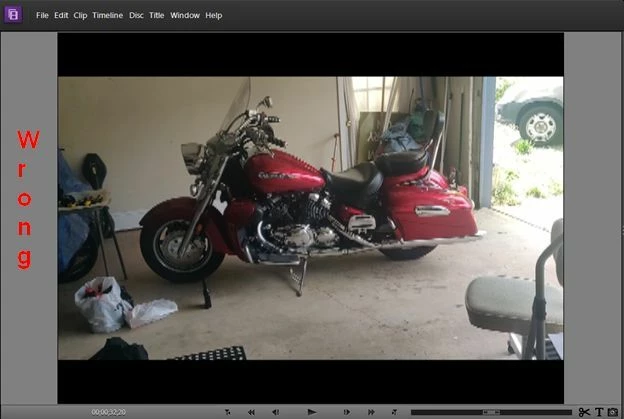
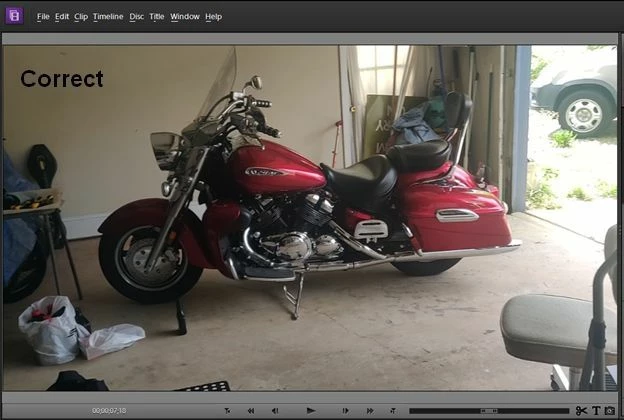


 AdChoices